- หน้าแรก /
- อิเล็กทรอนิกส์ /
- Computer Accessories /
- Networking Products /
- Print Servers /
- Blue~Tooth USB Print Server - Wireless Printe...
0 ratings






รายการ #:
37675863
Blue~Tooth USB Print Server - Wireless Printer Sharing for Windows & Android - Supports LAN and Blue~Tooth Printing,Turns Old USB Printer into
รายการ #:
37675863
THB 4522
Price Details
Excluding Shipping & Custom charges ( Shipping and custom charges will be calculated on checkout )
*All items will import from สหรัฐอเมริกา
0 ratings
เขียนรีวิว
มีสินค้า
 นำเข้าจาก USA ร้านค้า
สั่งซื้อตอนนี้และรับสินค้าประมาณ วันพฤหัสบดี, สิงหาคม 13
การทำธุรกรรมที่ปลอดภัย
Ubuy ทำงานอย่างหนักเพื่อปกป้องความปลอดภัยและความเป็นส่วนตัวของคุณ ระบบรักษาความปลอดภัยการชำระเงินขั้นสูงของเราช่วยให้ข้อมูลของคุณเป็นความลับ โดยการเข้ารหัสข้อมูลระหว่างการส่งโดยใช้โปรโตคอล AES (Advanced Encryption Standards) และ SSL (Secure Socket Layer) รายละเอียดการชำระเงินของคุณปลอดภัย 100% เนื่องจากเราไม่แบ่งปันข้อมูลการชำระเงินของคุณกับผู้ขายบุคคลที่สาม
พันธมิตรด้านโลจิสติกส์ชั้นนำของเรา


The LOYALTY-SECU Network Bluetooth Printer Adapter enables users to print from mobile devices and computers without network connections

Fast
Shipping

คืนสินค้าฟรี*

แพ็คสินค้าอย่างปลอดภัย

สินค้าแท้ 100%

PCI DSS Compliance

ISO 27001 Certified


Note: Step Down Voltage Transformer required for using electronics products of สหรัฐอเมริกา store (110-120). Recommended power converters ซื้อเลย.


จุดเด่น
Wireless Compatibility
Seamlessly shares any USB printer wirelessly with Windows and Android devices, eliminating the need for complicated wiring and enhancing mobility in printing tasks.
Dual Connectivity
Supports both LAN and Bluetooth printing, providing versatile connection options for different devices, ensuring convenience and flexibility in various environments.
Upgrade Legacy Printers
Transforms old USB printers into modern Bluetooth printers, extending their lifespan and functionality, making it a cost-effective solution for staying up-to-date with printing technology.
รายละเอียดสินค้า
- 1.Effortless Wireless Printing: Quickly transform your USB printer into a Blue~tooth network printer, enabling easy printing from Android smartphones and Windows computers via LAN or Blue~tooth.
- 2.Wide Application Scenarios: Ideal for small offices, schools, hotels, airport lounges, and more. Offers a 100-meter Blue~tooth range for printing on the go.
- 3.Multi-User Sharing Support: Share one USB printer with multiple users simultaneously over a LAN network or Blue~tooth for enhanced productivity.
- 4.Broad Compatibility: Supports Windows & Android system. Compatible with various file formats, including PDF, Word & Excel.
- 5.User-Friendly Configuration: Comes with a dedicated Windows Config Tool for quick setup. Easily assign IP addresses and configure settings for hassle-free operation.
| Printer Type | Inkjet |
| Other Special Features of the Product | Portable |
| Printer Output Type | Depends on User's printer |
| Item Weight | 220 Grams |
| Controller Type | Android |
| Print media | Labels |
| Compatible Devices | Android and Windows system smartphone and computer |
| Additional Printer Functions | Print Only |
| Control Method | App |
| Resolution | 600 x 600 |
| Color Pages per Minute | 1.00 |
| Maximum Media Size | Letter/A4 |
| Maximum Sheet Capacity | 150 |
| Paper Size | 297 millimeters |
| Printer Connectivity Type | USB |
| Hardware Interface | Ethernet, USB 2.0 |
| Dual-sided printing | Yes |
| Duplex | Simplex |
| Brand | LOYALTY-SECU |
| Model Name | LY-MPS-BN01 |
| Model Number | LY-MPS-BN01 |
| Built-In Media | USB Cable |
| Model Series | BN01 |
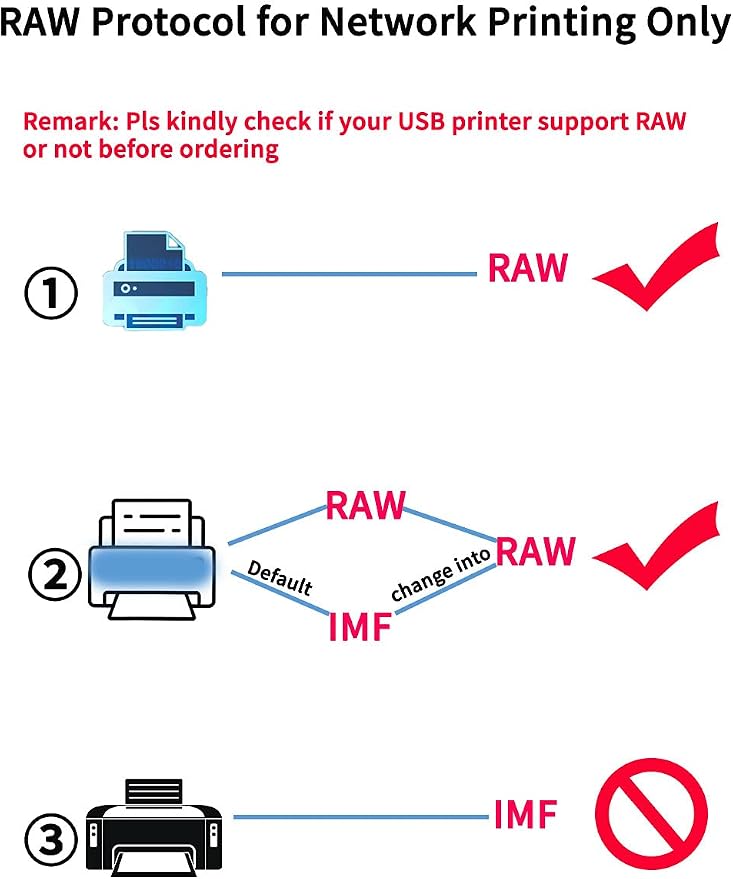
| Specific Uses For Product | LY-MPS-BN01 USB mini Print Adapter helps you quickly turn your USB-printer into a network printer |
| UPC | 602024353768 |
| Manufacturer | Shenzhen Loyalty-Secu Technology Co., LTD |
| Unit Count | 1.0 Count |
| Color | White |
| Maximum print Resolution Color | 600 x 600 dpi |
| Maximum Print Resolution Black and White | 600 dpi |
| Wattage | 5 Watt-hours |
| Connectivity Technology | USB |
| Printing Technology | Inkjet |
| Special Feature | Portable |
| Printer Output | Depends on User's printer |
| Maximum Print Speed (Color) | 1.00 |
| Package Weight | 1.27 Pound |
What's in the box
USB Cable
เหมาะสำหรับใคร?

-
Home Users
Ideal for individuals wanting to connect a USB printer wirelessly for convenient home printing without complicated setup.
-
Small Offices
Perfect for small teams needing shared access to a single printer from multiple devices, save costs on equipment.
-
Tech-Savvy Individuals
Great for users comfortable with technology who appreciate the convenience of Bluetooth and LAN wireless printing options.

-
High-Volume Users
Not suitable for offices with extensive printing demands, as it may not support multiple simultaneous connections efficiently.
-
Complex Printer Setups
Users with advanced printers or multifunction devices might find compatibility issues with the print server's technology.
-
Non-Technical Users
May not be ideal for those unfamiliar with setting up wireless devices, as it might require technical assistance.
ข้อมูลผลิตภัณฑ์
มีข้อสงสัย? คุยกับเรา
คําถามและคําตอบของลูกค้า
-
คำถาม:
What is a Blue~Tooth USB Print Server?
คำตอบ: A Blue~Tooth USB Print Server is a device that allows wireless printing from multiple devices such as Windows and Android systems to an old USB printer. It connects to the printer via USB and enables printing over Bluetooth or LAN connections. This is ideal for users looking to extend the life of their existing printers while enjoying the convenience of wireless printing, which can eliminate the hassle of tangled cords and physical connections. -
คำถาม:
How does wireless printing work with the Blue~Tooth USB Print Server?
คำตอบ: Wireless printing with a Blue~Tooth USB Print Server works by establishing a connection between your computer or mobile device and the print server. Once configured, the print server communicates wirelessly with the printer, allowing you to send print jobs from your devices without the need for direct USB connections. This setup is perfect for homes or offices where multiple users need to access the printer simultaneously without being physically tethered. -
คำถาม:
Is this print server compatible with Mac OS?
คำตอบ: The Blue~Tooth USB Print Server is primarily designed for use with Windows and Android devices. While some users have successfully used it with Mac OS, compatibility can vary depending on specific configurations and drivers. For best results, it's advisable to check the manufacturer's specifications or seek support for potential workarounds in case you need to connect a Mac device to this print server. -
คำถาม:
Can I connect multiple printers to one Blue~Tooth USB Print Server?
คำตอบ: Typically, a single Blue~Tooth USB Print Server can only connect to one USB printer at a time. If you need to share multiple printers, consider purchasing additional print servers for each printer. This setup allows efficient wireless printing from various devices while keeping your printing tasks organized and seamless across your home or office network. -
คำถาม:
What types of USB printers can I use with this print server?
คำตอบ: The Blue~Tooth USB Print Server is compatible with a wide range of USB printers, including inkjet, laser, and thermal printers. It's important to ensure that your printer is recognized and supported by checking its specifications. By utilizing this print server, you can turn an older USB printer into a valuable asset within a wireless network, allowing it to function alongside newer devices. -
คำถาม:
What are the benefits of using a Blue~Tooth USB Print Server for my printer?
คำตอบ: Using a Blue~Tooth USB Print Server offers several advantages: it brings wireless printing capabilities to older USB printers, enhances convenience by eliminating physical connections, and makes printing accessible from various devices such as laptops and smartphones. This solution is excellent for environments where space is limited or when frequent mobility is necessary, allowing for quick prints without the hassle of connecting and disconnecting cables. -
คำถาม:
How do I set up the Blue~Tooth USB Print Server?
คำตอบ: Setting up the Blue~Tooth USB Print Server involves connecting it to your USB printer and configuring the network settings through a simple setup process. Usually, you'll need to install any necessary drivers on your devices, connect to your Wi-Fi or Bluetooth network, and add the printer via your device's settings. This straightforward process allows you to quickly enjoy wireless printing from your preferred devices. -
คำถาม:
What kind of network do I need for the Blue~Tooth USB Print Server to work?
คำตอบ: The Blue~Tooth USB Print Server can function on both LAN (Ethernet) networks and Bluetooth connections. For optimal performance, a stable wireless network is recommended since it allows multiple users to access the printer from various devices without interruption. This flexibility makes it an excellent choice for both home use and small office environments where network reliability is crucial. -
คำถาม:
Can I print documents directly from my smartphone?
คำตอบ: Yes, with the Blue~Tooth USB Print Server, you can print documents directly from your smartphone. After connecting your smartphone to the print server via Bluetooth or ensuring it is compatible with the LAN setup, you can easily send documents or images to the printer. This capability is especially useful for users who prefer printing from mobile devices rather than traditional laptops or desktops. -
คำถาม:
Where can I buy the Blue~Tooth USB Print Server in Thailand?
คำตอบ: You can purchase the Blue~Tooth USB Print Server conveniently through Ubuy, which offers a user-friendly online shopping experience tailored for customers in Thailand. Ubuy provides detailed product information and a reliable platform for your tech needs, making it an excellent option for acquiring this print server and enhancing your printing capabilities.
LOYALTY-SECU Print Servers LY-MPS-BN01 Editorial Review
The LOYALTY-SECU Network Bluetooth Printer Adapter USB Print Server Without WiFi is a product that intends to enable users to connect their USB printer to a network using Bluetooth. According to the FAQs, the device works on Windows but not seamlessly on Mac via Bluetooth. However, the device may work with Mac when configured using the Windows computer. The product only supports printing, and scanning may require third-party software. The device comes with a US power plug and can work with the Dymo 450 printer and a Godex thermal printer model ez-dt-4 via Bluetooth or network connection. However, the device can't work with an iPhone smartphone. Although the device can work with Bluetooth, it may cause printing to be slower than network printing. Customers reported issues setting up the device using instructions that had small font sizes. However, some customers could set up the device but had to resort to third-party printing apps to use it. The product may have issues such as the print queue not clearing after printing jobs.
ความคิดเห็นและคะแนนจากลูกค้า
19 การให้คะแนนของลูกค้า
-
5 ดาว
42%
-
4 ดาว
18%
-
3 ดาว
9%
-
2 ดาว
14%
-
1 ดาว
17%
แบ่งปันความคิดของคุณกับลูกค้าท่านอื่น
แชร์ความคิดของคุณกับลูกค้ารายอื่น
ข้อดี
- Can connect a USB printer to the network using Bluetooth
- Comes with a US power plug
ข้อเสีย
- Small font size in the instructions makes it hard to read
Platform Trust & Buyer Confidence

MT
Mohd
Verified buyer
“The product received very good packaging & safe…Thank You”
16 June 2026 · via Trustpilot
SJ
Shawati
Verified buyer
“Accurate delivery timing given”
16 June 2026 · via Trustpilot
YB
Youcef
Verified buyer
“Not madly expensive like I thought, and much quicker than promised.”
15 June 2026 · via Trustpilot
LM
Leila
Verified buyer
“Never dealt with Ubuy before, but everything worked out great. Seamless cross border purchasing and shipping. Thanks!”
6/7/2026 · via Trustpilot
KA
Kwame
Verified buyer
“The process was smooth, with clear communication and timelines. This was my 1st purchase and I am really impressed. I will definitely be coming back.”
12 June 2026 · via Trustpilot
การชำระเงินที่มั่นใจได้
Global Delivery
การคืนสินค้าที่ง่ายดาย
Genuine Products
ประวัติราคาสินค้า
ข้อมูลสำคัญ
- ข้อจำกัด : สำหรับผลิตภัณฑ์ที่จัดส่งระหว่างประเทศ โปรดทราบว่าการรับประกันของผู้ผลิตอาจไม่ถูกต้อง ตัวเลือกบริการของผู้ผลิตอาจไม่สามารถใช้ได้ คู่มือผลิตภัณฑ์ คำแนะนำ และคำเตือนด้านความปลอดภัยอาจไม่เป็นภาษาของประเทศปลายทาง ผลิตภัณฑ์ (และวัสดุประกอบ) อาจไม่ได้รับการออกแบบตามมาตรฐาน คุณลักษณะเฉพาะ และข้อกำหนดเกี่ยวกับการติดฉลากของประเทศปลายทาง และผลิตภัณฑ์อาจใช้แรงดันไฟฟ้าไม่สอดคล้องกับของประเทศปลายทางและมาตรฐานทางไฟฟ้าอื่น ๆ (ต้องใช้อะแดปเตอร์หรือตัวแปลงไฟตามความเหมาะสม) ผู้รับมีหน้าที่ตรวจสอบให้แน่ใจว่าสินค้าสามารถนำเข้าประเทศปลายทางได้อย่างถูกกฎหมาย เมื่อสั่งซื้อจาก Ubuy หรือตัวแทนจำหน่าย ผู้รับคือผู้นำตามกฎหมาย และต้องปฏิบัติตามกฎหมายและระเบียบข้อบังคับทั้งหมดของประเทศปลายทาง
- ผลิตภัณฑ์บางรายการใน Ubuy ไม่ได้มีไว้เพื่อขาย เนื่องจาก Ubuy เป็นเครื่องมือค้นหาระดับโลก ผลิตภัณฑ์อยู่ภายใต้กฎระเบียบด้าน การส่งออก/การค้า
THB 4522
สั่งซื้อตอนนี้และรับสินค้าประมาณ วันพฤหัสบดี, สิงหาคม 13
This item is not restrict in my country.(Please click on above link if this item is not restrict in your country, So our team will review and allow.)
QTY:
การทำธุรกรรมที่ปลอดภัย
PCI DSS compliant and ISO 27001:2022 certified, with encrypted payments and full buyer protection on every order.
พันธมิตรด้านโลจิสติกส์ชั้นนำของเรา
การจัดส่งข้ามประเทศที่รวดเร็วที่สุด
คุณสมบัติและประโยชน์
- Supports Bluetooth function
- Print from mobile devices and computers in LAN network
- Supports multi-user sharing
- Supports various file formats
- Standard USB2.0 interface
- Equipped with 1pcs RJ45 LAN port
Ubuy Assurance
Experience worry-free shopping with 100% original products, PCI DSS-compliant payment security, ISO 27001-certified data protection, the fastest cross-border delivery, free returns *, and secure packaging on every order.