- หน้าแรก /
- วิดีโอเกม /
- PC /
- อุปกรณ์เสริม /
- Controllers /
- Joysticks /
- Zero Delay Arcade USB Encoder PC to Joystick ...





รายการ #:
79835117
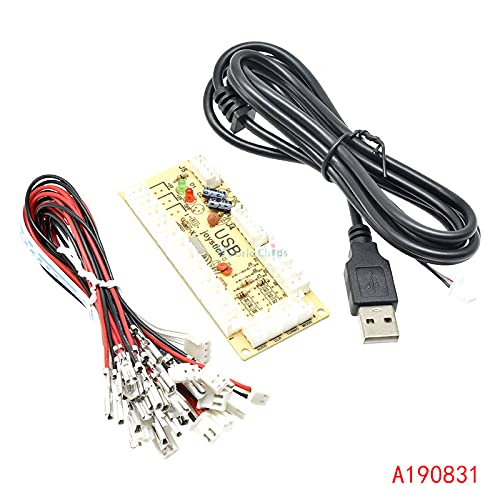
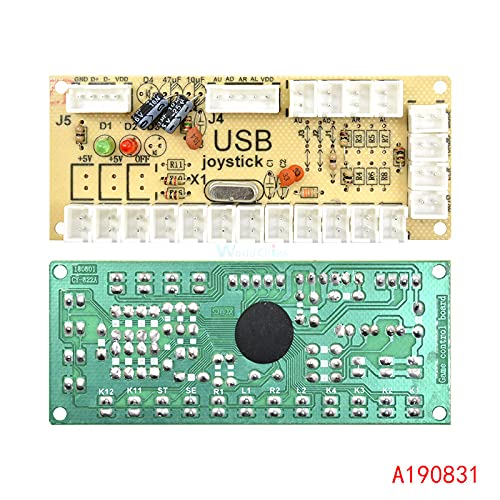
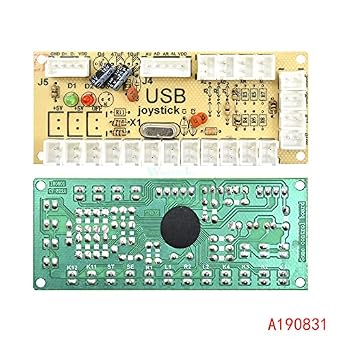
Zero Delay Arcade USB Encoder PC to Joystick Push Buttons Wired Cables for Fight Stick Control Module Board DIY Arcade Game Kit
ผู้ซื้อ 82% แนะนำสินค้านี้ให้เพื่อน
รายการ #:
79835117
THB 988
รายละเอียดราคา
ไม่รวมค่าจัดส่งและค่าธรรมเนียมศุลกากร ( ค่าจัดส่งและค่าธรรมเนียมศุลกากรจะคำนวณตอนชำระเงิน )
*สินค้าทั้งหมดจะนำเข้าจาก สหรัฐอเมริกา
0 ratings
เขียนรีวิว
มีสินค้า
 นำเข้าจาก USA ร้านค้า
สั่งซื้อตอนนี้และรับสินค้าประมาณ วันพฤหัสบดี, ตุลาคม 15
การทำธุรกรรมที่ปลอดภัย
Ubuy ทำงานอย่างหนักเพื่อปกป้องความปลอดภัยและความเป็นส่วนตัวของคุณ ระบบรักษาความปลอดภัยการชำระเงินขั้นสูงของเราช่วยให้ข้อมูลของคุณเป็นความลับ โดยการเข้ารหัสข้อมูลระหว่างการส่งโดยใช้โปรโตคอล AES (Advanced Encryption Standards) และ SSL (Secure Socket Layer) รายละเอียดการชำระเงินของคุณปลอดภัย 100% เนื่องจากเราไม่แบ่งปันข้อมูลการชำระเงินของคุณกับผู้ขายบุคคลที่สาม
พันธมิตรด้านโลจิสติกส์ชั้นนำของเรา


100% brand new and high quality

Fast
Shipping

คืนสินค้าฟรี*

แพ็คสินค้าอย่างปลอดภัย

สินค้าแท้ 100%

ผ่านมาตรฐาน PCI DSS

ได้รับการรับรอง ISO 27001












Note: Step Down Voltage Transformer required for using electronics products of สหรัฐอเมริกา store (110-120). Recommended power converters ซื้อเลย.


จุดเด่น
Zero Input Lag
Experience true responsiveness with zero input delay, enhancing your gaming precision and ensuring perfect control during intense gameplay sessions.
Versatile Compatibility
Designed to work seamlessly with a variety of systems and fight sticks, making it an ideal choice for DIY arcade enthusiasts looking for easy integration.
High-Quality Cables
Includes durable, high-quality wired cables that provide stable connections, ensuring long-lasting performance and reliability for all your arcade gaming needs.
รายละเอียดสินค้า
| Compatible Devices | Windows |
| Controller Type | Joystick |
| Connectivity Technology | USB |
| Hardware Platform | pc |
| Power Source | Corded Electric |
| Package Quantity | 1 |
| Brand Name | Midzoo |
| Manufacturer | Midzoo |
| Manufacturer Part Number | MiMODULE-12715 |
| Brand | Midzoo |
| Item Package Quantity | 1 |
| Item Weight | 0.5 lbs (230 grams) |
เหมาะสำหรับใคร?

-
DIY Arcade Builders
Perfect for enthusiasts looking to create their own arcade fight stick using customized buttons and joysticks.
-
Retro Game Players
Ideal for gamers wanting a convenient controller for playing retro arcade-style games on PC.
-
Cost-Effective Solutions
Great for those seeking an affordable option to enhance their gaming setup or repair an existing stick.

-
Non-Technical Users
Not suitable for individuals unfamiliar with DIY projects or basic electronics, as assembly is required.
ข้อมูลผลิตภัณฑ์
มีข้อสงสัย? คุยกับเรา
คำถามและคำตอบของลูกค้า
-
คำถาม:
What is the Zero Delay Arcade USB Encoder?
คำตอบ: The Zero Delay Arcade USB Encoder is a device that transforms inputs from arcade joystick and push button setups into signals that your PC can recognize. It’s essential for anyone interested in building their own fight stick or arcade game setup. The encoder connects to your computer via USB and allows for a seamless connection between your arcade components and various PC gaming platforms, making it a popular choice for DIY enthusiasts. -
คำถาม:
How do I connect the Zero Delay USB Encoder to my joystick and buttons?
คำตอบ: To connect the Zero Delay USB Encoder, you will first identify the terminals on the encoder corresponding to the joystick and push buttons. Using wired cables, connect each of the components to the appropriate terminal, ensuring the correct orientation for functionality. Instructions often come with the encoder, and online resources provide tutorials. This setup is ideal for homemade arcade cabinets or fight sticks, enabling bespoke gaming experiences. -
คำถาม:
Can I use this encoder with any joystick or push button?
คำตอบ: Yes, the Zero Delay Arcade USB Encoder is compatible with most standard joysticks and push buttons used in arcade setups. As long as the joystick and buttons have the appropriate input connections (typically, 5-pin or 4-pin), they can be connected to this encoder. This versatility allows gamers to customize their control layouts as they see fit, tailoring their arcade experience to personal preferences. -
คำถาม:
Is the Zero Delay USB Encoder suitable for PC gaming only?
คำตอบ: While the Zero Delay USB Encoder is primarily designed for use with PC gaming, it can also work with emulators for various gaming consoles. It is ideal for or retro gaming enthusiasts who want to use arcade controls for their favorite games. This functionality makes it flexible for a variety of gaming scenarios, from traditional PC gaming to nostalgic emulation setups. -
คำถาม:
What is the installation process like for the Zero Delay Encoder?
คำตอบ: The installation process for the Zero Delay Encoder typically involves connecting the encoder to your joystick and buttons using supplied cables and configuring the inputs in your PC settings. Many users find detailed manuals or video tutorials helpful for guidance. This ease of installation makes it great for users ranging from novice DIYers to experienced builders who want to create personalized arcade controls. -
คำถาม:
Can I use multiple encoders for different setups?
คำตอบ: Yes, you can connect multiple Zero Delay USB Encoders to a single PC, allowing for different arcade controls or setups to be managed independently. Each encoder can represent a different joystick/button layout, ideal for creating multiple gaming profiles. This is particularly useful if you frequently switch between different types of arcade games or if you wish to host local multiplayer sessions. -
คำถาม:
What are the common uses for the Zero Delay Arcade USB Encoder?
คำตอบ: The Zero Delay Arcade USB Encoder is mainly used for DIY arcade game kits, including home-built fight sticks, arcade cabinets, and custom gaming setups. Gamers looking to replicate authentic arcade experiences often choose this encoder for its reliability and compatibility. It's also favored in gaming tournaments where customized controls can provide performance advantages. -
คำถาม:
Can I program the buttons and joystick movements?
คำตอบ: Yes, the Zero Delay USB Encoder typically allows for button reprogramming, letting users assign specific functions or macros to each button. This is particularly useful for competitive gaming, where specific button mappings may enhance performance. For instance, users can designate rapid-fire functions or combos that enhance gameplay with ease. -
คำถาม:
What is included in the Zero Delay USB Encoder kit?
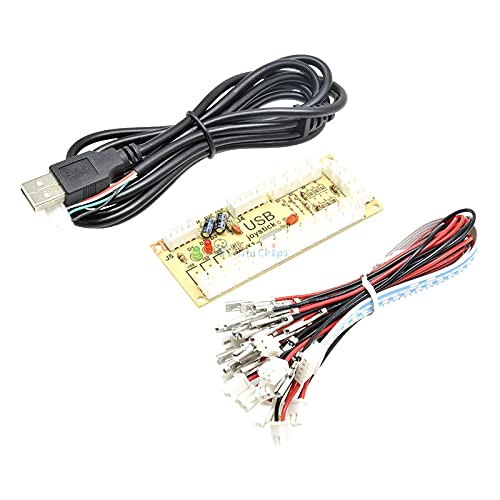
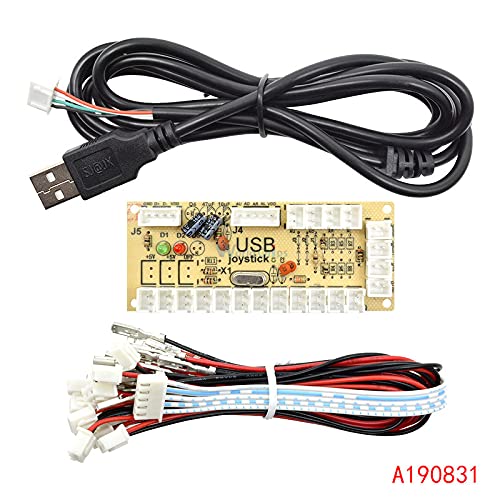
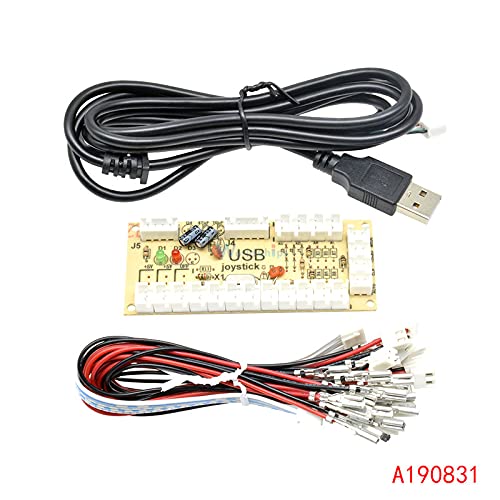
คำตอบ: The Zero Delay USB Encoder kit usually includes the encoder board, a set of wires for connecting joysticks and buttons, and documentation for setup. Some kits may also come with button connectors or additional hardware needed for installation. This comprehensive approach ensures users have all necessary components for crafting their custom arcade controls. -
คำถาม:
Where can I buy Zero Delay Arcade USB Encoder in Thailand?
คำตอบ: You can purchase the Zero Delay Arcade USB Encoder at Ubuy, which offers a convenient shopping experience tailored for your needs. They provide a variety of arcade accessories, including this encoder, and streamline the buying process to ensure it meets your DIY arcade project requirements.
Midzoo Joysticks Editorial Review
Zero Delay Arcade USB Encoder PC to Joystick Push Buttons Wired Cables for Fight Stick Control Module Board DIY Arcade Game Kit is designed for a seamless gaming experience on Windows PCs. This encoder is ideal for customizing your arcade setup with compatibility for joystick control and push buttons. Users appreciate its straightforward USB connectivity, making installation hassle-free for DIY enthusiasts. The corded electric power source ensures consistent performance during intense gaming sessions, and the package includes everything necessary for a complete arcade setup. Whether you're building a fight stick or upgrading your existing arcade machine, this encoder delivers reliability and ease of use.
ความคิดเห็นและคะแนนจากลูกค้า
1 การให้คะแนนของลูกค้า
-
5 ดาว
0%
-
4 ดาว
100%
-
3 ดาว
0%
-
2 ดาว
0%
-
1 ดาว
0%
แบ่งปันความคิดของคุณกับลูกค้าท่านอื่น
แชร์ความคิดของคุณกับลูกค้ารายอื่น
ข้อดี
- Compatible with Windows PCs for easy setup
- Supports joystick and push button configurations
- USB connectivity for simple plug-and-play installation
- Lightweight design makes it easy to handle
- Reliable performance during intense gaming sessions
ข้อเสีย
- Limited to corded electric power source only
ความน่าเชื่อถือของแพลตฟอร์ม

JG
Jazz
ผู้ซื้อที่ยืนยันแล้ว
“Easy to use and always helpful and sorts any issues I've had past and present”
1 September 2026 · ผ่าน Trustpilot
EK
Emmanuel
ผู้ซื้อที่ยืนยันแล้ว
“I always receive support when I engage customer service. Overall my experience with UBUY has been top notch. Keep up the good work.”
31 August 2026 · ผ่าน Trustpilot
F
fnd
ผู้ซื้อที่ยืนยันแล้ว
“The delivery was fast and the product came undamaged and authentic.”
29 August 2026 · ผ่าน Trustpilot
LC
Leana
ผู้ซื้อที่ยืนยันแล้ว
“Ubuy is extremely efficient and to order online is an easy process. The verity of products to buy is really unlimited! My order was urgent and I got it on time. The products are great! Thank you Ubuy!”
25 August 2026 · ผ่าน Trustpilot
HL
Hengo
ผู้ซื้อที่ยืนยันแล้ว
“Fast, convenient and cheap. Great store!”
27 August 2026 · ผ่าน Trustpilot
การชำระเงินที่มั่นใจได้
จัดส่งทั่วโลก
การคืนสินค้าที่ง่ายดาย
สินค้าของแท้
ประวัติราคาสินค้า
ข้อมูลสำคัญ
- ข้อจำกัด: สำหรับสินค้าที่จัดส่งระหว่างประเทศ โปรดทราบว่าการรับประกันจากผู้ผลิตอาจไม่มีผลบังคับใช้ บริการหลังการขายจากผู้ผลิตอาจไม่สามารถใช้งานได้ คู่มือผลิตภัณฑ์ คำแนะนำการใช้งาน และคำเตือนด้านความปลอดภัยอาจไม่ได้จัดทำเป็นภาษาของประเทศปลายทาง สินค้า (รวมถึงเอกสารประกอบ) อาจไม่ได้ออกแบบให้สอดคล้องกับมาตรฐาน ข้อกำหนด และข้อบังคับด้านฉลากของประเทศปลายทาง และสินค้าอาจไม่สอดคล้องกับแรงดันไฟฟ้าและมาตรฐานทางไฟฟ้าอื่น ๆ ของประเทศปลายทาง (ซึ่งอาจต้องใช้ปลั๊กแปลงไฟหรือเครื่องแปลงแรงดันไฟฟ้าตามความเหมาะสม) ผู้รับสินค้ามีหน้าที่รับผิดชอบในการตรวจสอบว่าสินค้าดังกล่าวสามารถนำเข้าประเทศปลายทางได้อย่างถูกต้องตามกฎหมาย เมื่อสั่งซื้อสินค้าจาก Ubuy หรือบริษัทในเครือ ผู้รับสินค้าจะถือเป็นผู้นำเข้าตามกฎหมาย (Importer of Record) และต้องปฏิบัติตามกฎหมายและข้อบังคับทั้งหมดของประเทศปลายทาง
- ผลิตภัณฑ์บางรายการใน Ubuy ไม่ได้มีไว้เพื่อขาย เนื่องจาก Ubuy เป็นเครื่องมือค้นหาระดับโลก ผลิตภัณฑ์อยู่ภายใต้กฎระเบียบด้าน การส่งออก/การค้า
THB 988
สั่งซื้อตอนนี้และรับสินค้าประมาณ วันพฤหัสบดี, ตุลาคม 15
สินค้านี้ไม่ถูกจำกัดในประเทศของฉัน (หากสินค้านี้ไม่ถูกจำกัดในประเทศของคุณ กรุณาคลิกลิงก์ด้านบน ทีมงานของเราจะตรวจสอบและเปิดให้สั่งซื้อ)
จำนวน:
การทำธุรกรรมที่ปลอดภัย
ได้รับการรับรอง PCI DSS และ ISO 27001:2022 พร้อมการชำระเงินแบบเข้ารหัสและการคุ้มครองผู้ซื้อเต็มรูปแบบทุกคำสั่งซื้อ
พันธมิตรด้านโลจิสติกส์ชั้นนำของเรา
การจัดส่งข้ามพรมแดนที่เร็วที่สุด
คุณสมบัติและประโยชน์
- High-performance COMS technology
- Supports multiple forms of gaming devices
- TURBO support function keys and AUTO mode
- Supports USB1.0 / USB2.0
- Compatible with Win98 / Win Me / Win 2000 / Win XP
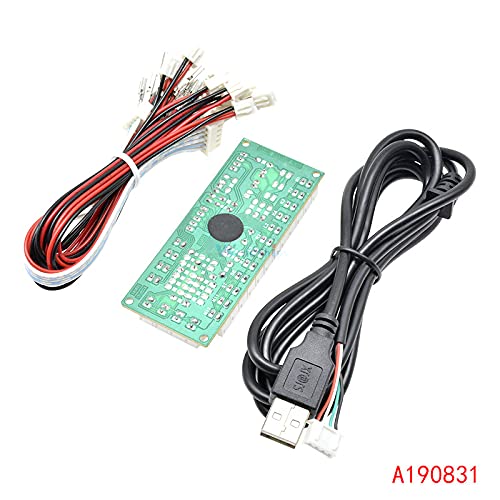
- Package includes: Encoder Board, USB Cable, Plug Cables
การรับประกันจาก Ubuy
ช้อปสบายใจไร้กังวล ด้วยสินค้าของแท้ 100% ระบบชำระเงินปลอดภัยได้มาตรฐาน PCI DSS การปกป้องข้อมูลด้วยมาตรฐาน ISO 27001 การจัดส่งข้ามพรมแดนที่รวดเร็วที่สุด คืนสินค้าฟรี และบรรจุภัณฑ์ที่ปลอดภัยในทุกคำสั่งซื้อ*