- หน้าแรก /
- อิเล็กทรอนิกส์ /
- อุปกรณ์เสริมคอมพิวเตอร์ /
- Networking Products /
- Switches /
- Barco ClickShare Button Switch, Gray (R986150...


รายการ #:
4650856
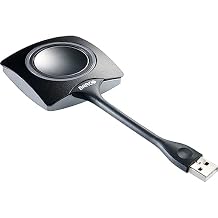
Barco ClickShare Button Switch, Gray (R9861500D01) for Laptop
รายการ #:
4650856
THB 4538
รายละเอียดราคา
ไม่รวมค่าจัดส่งและค่าธรรมเนียมศุลกากร ( ค่าจัดส่งและค่าธรรมเนียมศุลกากรจะคำนวณตอนชำระเงิน )
*สินค้าทั้งหมดจะนำเข้าจาก สหรัฐอเมริกา
0 ratings
เขียนรีวิว
มีสินค้า
 นำเข้าจาก USA ร้านค้า
สั่งซื้อตอนนี้และรับสินค้าประมาณ วันพฤหัสบดี, กันยายน 17
การทำธุรกรรมที่ปลอดภัย
Ubuy ทำงานอย่างหนักเพื่อปกป้องความปลอดภัยและความเป็นส่วนตัวของคุณ ระบบรักษาความปลอดภัยการชำระเงินขั้นสูงของเราช่วยให้ข้อมูลของคุณเป็นความลับ โดยการเข้ารหัสข้อมูลระหว่างการส่งโดยใช้โปรโตคอล AES (Advanced Encryption Standards) และ SSL (Secure Socket Layer) รายละเอียดการชำระเงินของคุณปลอดภัย 100% เนื่องจากเราไม่แบ่งปันข้อมูลการชำระเงินของคุณกับผู้ขายบุคคลที่สาม
พันธมิตรด้านโลจิสติกส์ชั้นนำของเรา


Fast
Shipping

คืนสินค้าฟรี*

แพ็คสินค้าอย่างปลอดภัย

สินค้าแท้ 100%

ผ่านมาตรฐาน PCI DSS

ได้รับการรับรอง ISO 27001












Note: Step Down Voltage Transformer required for using electronics products of สหรัฐอเมริกา store (110-120). Recommended power converters ซื้อเลย.


จุดเด่น
Instant Connectivity
Experience seamless wireless connection to your laptop, enabling instant screen sharing without the hassle of cables or complex setups, making meetings more efficient and productive.
Compact Design
The sleek and portable design of the ClickShare Button ensures easy transportation and integration into any workspace, allowing users to present effortlessly from various devices.
Cross-Platform Compatibility
Designed to work with a wide range of operating systems, this device supports both Windows and macOS, ensuring an inclusive solution for diverse user environments and maximizing usability.
รายละเอียดสินค้า
| Operation Mode | OFF-NONE-ON |
| Current Rating | 2 Microamps |
| Operating Voltage | 120 Volts |
| Contact Type | Normally Open |
| Connector Type | Usb Type a |
| Switch Type | Kill Switch |
| Terminal | Solder |
| Circuit Type | 2-way |
| Mounting Type | Plug-In Mount |
| Actuator Type | Button |
| Number of Positions | 4 |
| Lower Temperature Rating | 101 Degrees Fahrenheit |
| Upper Temperature Rating | 100 Degrees Fahrenheit |
| Control Method | Touch |
| Connectivity Protocol | Wi-Fi |
| Wattage | 230 watts |
| Control Type | Manual |
| Compatible Devices | Laptop |
| Color | Gray |
| Item Dimensions | 6.58 x 3 x 1.38 inches (16.7 x 7.6 x 3.5 cm) |
| Unit Count | 1.0 Count |
| Number of Items | 1 |
| Material Type | Unspecified |
| Contact Material | Brass |
| International Protection Rating | IP54 |
| Brand Name | Barco |
| Model | R9861500D01 |
| Global Trade Identification Number | 05400503000005 |
| Manufacturer | Barco |
| UPC | 053926320431 783555029664 750408401885 796594593300 783555095348 642892822317 |
| Part Number | R9861500D01 |
| Item Type Name | Barco Clickshare Button - Button Switch (R9861500D01) |
| Included Components | Button switch |
| Item Weight | 0.28 Pounds (130 grams) |
| Brand | Barco |
| Material | Unspecified |
| Item dimensions L x W x H | 6.58 x 3 x 1.38 inches (16.7 x 7.6 x 3.5 cm) |
เหมาะสำหรับใคร?

-
Frequent Presenters
Ideal for professionals who frequently present and need quick and easy screen sharing in meetings.
-
Remote Workers
Perfect for remote employees who participate in virtual meetings, simplifying their connection to various display devices.
-
Tech-Savvy Teams
Beneficial for teams that value seamless technology integration for collaborative presentations and brainstorming sessions.

-
Casual Users
Not suitable for occasional users who do not need regular access to wireless presentation tools.
ข้อมูลผลิตภัณฑ์
Barco ClickShare Button Switch, Gray (R9861500D01) for Laptop
มีข้อสงสัย? คุยกับเรา
คำถามและคำตอบของลูกค้า
-
คำถาม:
What is the Barco ClickShare Button?
คำตอบ: The Barco ClickShare Button is a USB wireless presentation system that allows users to share their screens seamlessly during meetings and presentations. By connecting the Button to your device and pressing it, you can instantly share content to a connected display. This ease of use reduces the time spent on technical setups and improves collaboration, making it ideal for business environments, conference rooms, and educational settings. -
คำถาม:
How does the ClickShare Button connect to my device?
คำตอบ: The ClickShare Button connects to your device via USB and is compatible with Windows and Mac operating systems. Once you plug the Button into your USB port, you will initiate the ClickShare app, which facilitates the wireless connection to the ClickShare Base Unit. This straightforward process ensures that anyone can present without needing technical expertise, making it particularly effective in team collaborations and presentations. -
คำถาม:
Can I use the ClickShare Button with multiple devices?
คำตอบ: Yes, the ClickShare Button can be used with multiple devices. You simply need to change the USB connection to the device you wish to present from. Each time you switch devices, you’ll need to ensure that the ClickShare application is running on the new device. This versatility allows different team members to present their content effortlessly in a collaborative workspace without needing a permanent setup for each device. -
คำถาม:
What types of content can I share using the ClickShare Button?
คำตอบ: You can share a wide range of content types using the ClickShare Button, including slideshows, videos, images, and real-time applications. Since it wirelessly transmits your screen content to the display, you can engage your audience with both static and dynamic media. This capability is particularly useful during business presentations, educational lectures, or any scenario where visual content enhances communication. -
คำถาม:
Do I need to install software to use the ClickShare Button?
คำตอบ: Yes, the ClickShare Button requires the ClickShare application to be installed on your device. The software facilitates the wireless presentation process and ensures compatibility with various operating systems. By setting up the app before your presentation, users can experience a smooth and professional sharing experience without technical interruptions, making it especially convenient for last-minute setups. -
คำถาม:
Is the ClickShare Button portable?
คำตอบ: Absolutely! The ClickShare Button is designed to be compact and lightweight, making it highly portable. You can easily carry it in your pocket or laptop bag, ensuring that you’re always prepared for impromptu meetings. This portability is ideal for professionals who move between different workspaces or frequently attend conferences, as it allows for seamless sharing anytime, anywhere. -
คำถาม:
Can I share content from a mobile device with the ClickShare Button?
คำตอบ: The ClickShare Button primarily connects through USB on laptops or desktop computers. However, you can share content from mobile devices by using the ClickShare mobile app, which is available for both iOS and Android. This flexibility enables users to present content from their smartphones or tablets, enhancing engagement during meetings or presentations in any business or educational setting. -
คำถาม:
How do I troubleshoot connection issues with the ClickShare Button?
คำตอบ: If you encounter connection issues with the ClickShare Button, first ensure that the app is running on your device and that the Button is securely plugged in. Restarting the application or re-establishing the connection can often resolve issues. Checking your Wi-Fi connection can also be critical, as the ClickShare system relies on a stable network. Troubleshooting these elements will typically restore your presentation capabilities promptly. -
คำถาม:
What makes the ClickShare Button suitable for corporate environments?
คำตอบ: The ClickShare Button enhances collaboration and productivity in corporate environments by simplifying the screen-sharing process. Its user-friendly design allows team members to present effortlessly without extensive setup or technical knowledge. This feature is particularly beneficial in fast-paced business meetings where time is of the essence, as it encourages participation and streamlines communication among colleagues. -
คำถาม:
Where can I buy the Barco ClickShare Button | USB Wireless Presentation System Button R9861500D01 in Thailand?
คำตอบ: You can purchase the Barco ClickShare Button | USB Wireless Presentation System Button R9861500D01 from Ubuy in Thailand. Ubuy offers a reliable platform for acquiring a variety of tech products and ensures that you receive genuine products with efficient service, making it a convenient choice for your presentation needs.
Barco Switches Editorial Review
The Barco ClickShare Button Switch seems to have received mixed reviews from customers. Some users have found the product to be great and perfect for training or meetings, and very easy to share screen content. They appreciate the convenience it offers and Consider it a valuable tool for their work. On the other hand, there are users who have expressed dissatisfaction with the product. A customer criticized its price, stating that there are free options available for screen sharing and expressing that the product is way too expensive. They also complained about its functionality, mentioning issues with connectivity, particularly on MacOS, and stated that it is not a reliable solution. Another customer recommended avoiding the ClickShare and using a long HDMI cable instead, due to the inconvenience and headaches they experienced with the product.
ความคิดเห็นและคะแนนจากลูกค้า
1 การให้คะแนนของลูกค้า
-
5 ดาว
100%
-
4 ดาว
0%
-
3 ดาว
0%
-
2 ดาว
0%
-
1 ดาว
0%
แบ่งปันความคิดของคุณกับลูกค้าท่านอื่น
แชร์ความคิดของคุณกับลูกค้ารายอื่น
ข้อดี
- Easy to share screen content
- Convenient for work-related presentations
ข้อเสีย
- Expensive
ความน่าเชื่อถือของแพลตฟอร์ม

MA
Mohammad
ผู้ซื้อที่ยืนยันแล้ว
“Excellent quality and original too,when ubuy send original things I will appreciate that ,I very satisfied thank you”
23 July 2026 · ผ่าน Trustpilot
CK
Chitra
ผู้ซื้อที่ยืนยันแล้ว
“The order and delivery progress was communicated very well. Package arrived within the estimated time. Products arrived as expected in good condition.”
22-Jul-26 · ผ่าน Trustpilot
K
kund
ผู้ซื้อที่ยืนยันแล้ว
“Good supply of products. Safe payment methods, and shipment worldwide! Genuine products.”
23-Jul-26 · ผ่าน Trustpilot
OO
Onesi
ผู้ซื้อที่ยืนยันแล้ว
“Was my first time buying a product from Ubuy, but I found it so helpful. This is reliable. Gonna place a new order!”
22 July 2026 · ผ่าน Trustpilot
SJ
SAO JOHN
ผู้ซื้อที่ยืนยันแล้ว
“Ubuy is a great online platform to buy stuff. Reliable, fast delivery time and great value for money. I've been using Ubuy online shopping platform for three years now and will continue to do so.”
23 July 2026 · ผ่าน Trustpilot
การชำระเงินที่มั่นใจได้
จัดส่งทั่วโลก
การคืนสินค้าที่ง่ายดาย
สินค้าของแท้
ประวัติราคาสินค้า
ข้อมูลสำคัญ
- ข้อจำกัด: สำหรับสินค้าที่จัดส่งระหว่างประเทศ โปรดทราบว่าการรับประกันจากผู้ผลิตอาจไม่มีผลบังคับใช้ บริการหลังการขายจากผู้ผลิตอาจไม่สามารถใช้งานได้ คู่มือผลิตภัณฑ์ คำแนะนำการใช้งาน และคำเตือนด้านความปลอดภัยอาจไม่ได้จัดทำเป็นภาษาของประเทศปลายทาง สินค้า (รวมถึงเอกสารประกอบ) อาจไม่ได้ออกแบบให้สอดคล้องกับมาตรฐาน ข้อกำหนด และข้อบังคับด้านฉลากของประเทศปลายทาง และสินค้าอาจไม่สอดคล้องกับแรงดันไฟฟ้าและมาตรฐานทางไฟฟ้าอื่น ๆ ของประเทศปลายทาง (ซึ่งอาจต้องใช้ปลั๊กแปลงไฟหรือเครื่องแปลงแรงดันไฟฟ้าตามความเหมาะสม) ผู้รับสินค้ามีหน้าที่รับผิดชอบในการตรวจสอบว่าสินค้าดังกล่าวสามารถนำเข้าประเทศปลายทางได้อย่างถูกต้องตามกฎหมาย เมื่อสั่งซื้อสินค้าจาก Ubuy หรือบริษัทในเครือ ผู้รับสินค้าจะถือเป็นผู้นำเข้าตามกฎหมาย (Importer of Record) และต้องปฏิบัติตามกฎหมายและข้อบังคับทั้งหมดของประเทศปลายทาง
- ผลิตภัณฑ์บางรายการใน Ubuy ไม่ได้มีไว้เพื่อขาย เนื่องจาก Ubuy เป็นเครื่องมือค้นหาระดับโลก ผลิตภัณฑ์อยู่ภายใต้กฎระเบียบด้าน การส่งออก/การค้า
THB 4538
สั่งซื้อตอนนี้และรับสินค้าประมาณ วันพฤหัสบดี, กันยายน 17
สินค้านี้ไม่ถูกจำกัดในประเทศของฉัน (หากสินค้านี้ไม่ถูกจำกัดในประเทศของคุณ กรุณาคลิกลิงก์ด้านบน ทีมงานของเราจะตรวจสอบและเปิดให้สั่งซื้อ)
จำนวน:
การทำธุรกรรมที่ปลอดภัย
ได้รับการรับรอง PCI DSS และ ISO 27001:2022 พร้อมการชำระเงินแบบเข้ารหัสและการคุ้มครองผู้ซื้อเต็มรูปแบบทุกคำสั่งซื้อ
พันธมิตรด้านโลจิสติกส์ชั้นนำของเรา
การจัดส่งข้ามพรมแดนที่เร็วที่สุด
การรับประกันจาก Ubuy
ช้อปสบายใจไร้กังวล ด้วยสินค้าของแท้ 100% ระบบชำระเงินปลอดภัยได้มาตรฐาน PCI DSS การปกป้องข้อมูลด้วยมาตรฐาน ISO 27001 การจัดส่งข้ามพรมแดนที่รวดเร็วที่สุด คืนสินค้าฟรี และบรรจุภัณฑ์ที่ปลอดภัยในทุกคำสั่งซื้อ*