- หน้าแรก /
- อิเล็กทรอนิกส์ /
- Accessories & Supplies /
- Office Electronics Accessories /
- Labeling Tapes /
- BRTPTP700 - Brother PT-P700 PC-Connectable La...


รายการ #:
17323033
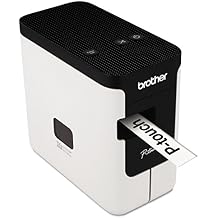
BRTPTP700 - Brother PT-P700 PC-Connectable Labeler
รายการ #:
17323033
THB 3448
Price Details
Excluding Shipping & Custom charges ( Shipping and custom charges will be calculated on checkout )
*All items will import from สหรัฐอเมริกา
0 ratings
เขียนรีวิว
มีสินค้า
 นำเข้าจาก USA ร้านค้า
สั่งซื้อตอนนี้และรับสินค้าประมาณ วันพฤหัสบดี, กรกฎาคม 02
การทำธุรกรรมที่ปลอดภัย
Ubuy ทำงานอย่างหนักเพื่อปกป้องความปลอดภัยและความเป็นส่วนตัวของคุณ ระบบรักษาความปลอดภัยการชำระเงินขั้นสูงของเราช่วยให้ข้อมูลของคุณเป็นความลับ โดยการเข้ารหัสข้อมูลระหว่างการส่งโดยใช้โปรโตคอล AES (Advanced Encryption Standards) และ SSL (Secure Socket Layer) รายละเอียดการชำระเงินของคุณปลอดภัย 100% เนื่องจากเราไม่แบ่งปันข้อมูลการชำระเงินของคุณกับผู้ขายบุคคลที่สาม
พันธมิตรด้านโลจิสติกส์ชั้นนำของเรา


Create large, durable labels for indoor or outdoor use.

Fast
Shipping

คืนสินค้าฟรี*

แพ็คสินค้าอย่างปลอดภัย

สินค้าแท้ 100%

PCI DSS Compliance

ISO 27001 Certified


Note: Step Down Voltage Transformer required for using electronics products of สหรัฐอเมริกา store (110-120). Recommended power converters ซื้อเลย.


รายละเอียดสินค้า
| Item Weight | 2.6 lbs (1.18 kg) |
ข้อมูลผลิตภัณฑ์
BRTPTP700 - Brother PT-P700 PC-Connectable Labeler
มีข้อสงสัย? คุยกับเรา
คําถามและคําตอบของลูกค้า
-
คำถาม:
What features does the Brother PT-P700 labeler offer?
คำตอบ: The Brother PT-P700 labeler boasts several advanced features including wireless connectivity, mobile app compatibility, and a full QWERTY keyboard for easy text entry. Additionally, it allows for label customization with various fonts, symbols, and frames. This makes it ideal for both personal and professional labeling needs, providing users the flexibility to create labels for anything from office organization to home decor. -
คำถาม:
Can I connect the Brother PT-P700 to my PC?
คำตอบ: Yes, the Brother PT-P700 is designed to connect seamlessly to PCs via USB. This connection enables users to utilize advanced label design software provided by Brother, allowing for more customization options. Whether you’re creating address labels, file organization labels, or custom signage, this labeler makes it straightforward to achieve professional results right from your desktop. -
คำถาม:
How can I create labels using my smartphone?
คำตอบ: You can create labels using your smartphone by downloading the Brother iPrint & Label app, which is compatible with both iOS and Android devices. The app allows you to design labels on your smartphone and send them directly to the PT-P700 via Bluetooth or Wi-Fi. This feature is particularly useful for on-the-go labeling, enabling you to efficiently produce labels for events, products, or even school supplies without being tethered to a computer. -
คำถาม:
What types of labels can I print with the PT-P700?
คำตอบ: The PT-P700 can print a diverse range of labels using Brother's P-touch tape, available in various widths, colors, and materials. This includes tape for indoor and outdoor applications, making it suitable for labeling everything from file storage to outdoor equipment. This versatility allows users to meet a variety of labeling needs, from crafting labels for home organization to creating durable labels for industrial settings. -
คำถาม:
Is the Brother PT-P700 portable?
คำตอบ: Yes, the Brother PT-P700 is designed with portability in mind, featuring a compact size and lightweight design. It can be powered via AC adapter or USB, making it practical for both home and mobile use. This portability is beneficial for users who need to create labels in various locations, like at events, while visiting clients, or anywhere labeling is needed on-site. -
คำถาม:
What are the common applications for the Brother PT-P700 labeler?
คำตอบ: The Brother PT-P700 is versatile and commonly used in offices for organizing files and folders, in warehouses for inventory labeling, and in homes for various DIY projects. It's also great for personalizing gifts or creating custom labels for home organization, making it an essential tool for both professional and personal environments. -
คำถาม:
What types of tape are compatible with the Brother PT-P700?
คำตอบ: The PT-P700 is compatible with Brother's P-touch tape, including standard laminated tape, flexible fabric tape, and even specialty tapes like glow-in-the-dark or metallic finishes. This range of tape varieties allows users to achieve specific aesthetic effects or functionalities, catering to diverse labeling needs from everyday labeling to creative projects. -
คำถาม:
How do you change the tape in the Brother PT-P700?
คำตอบ: Changing the tape in the Brother PT-P700 is straightforward. Open the tape compartment, remove the old cartridge, and insert the new one ensuring it’s seated correctly. This quick process allows users to swiftly switch between different tape types and colors, which is particularly useful when you want to produce a varying range of labels for different purposes. -
คำถาม:
What is the print speed of the Brother PT-P700?
คำตอบ: The PT-P700 delivers a print speed of up to 30mm per second, making it efficient for batch printing or high-volume labeling tasks. This speed ensures a timely output when creating multiple labels for projects, such as preparing items for events or organizing a workspace, decreasing downtime and increasing productivity. -
คำถาม:
Where can I buy the Brother PT-P700 PC-Connectable Labeler?
คำตอบ: You can purchase the Brother PT-P700 PC-Connectable Labeler at Ubuy in Thailand. Ubuy offers a wide selection of Brother products, ensuring you can find the labeler that meets your needs along with any accessories or compatible tapes.
Brother Labeling Tapes Editorial Review
The Brother PT-P700 PC-Connectable Labeler has received mostly positive reviews from customers. A customer noted that the labeler is easy to use and is perfect for creating labels for home filing needs. Another customer mentioned that the labeler is quick and efficient, making labeling tasks easier and faster. A few customers also commented on the variety of font styles and label sizes available, which can accommodate a wide range of labeling needs. Overall, the Brother PT-P700 PC-Connectable Labeler has been well received for its ease of use, efficiency, and versatility.
ความคิดเห็นและคะแนนจากลูกค้า
1 การให้คะแนนของลูกค้า
-
5 ดาว
0%
-
4 ดาว
100%
-
3 ดาว
0%
-
2 ดาว
0%
-
1 ดาว
0%
แบ่งปันความคิดของคุณกับลูกค้าท่านอื่น
แชร์ความคิดของคุณกับลูกค้ารายอื่น
ข้อดี
- Easy to use
- Efficient
- Variety of font styles and label sizes available
ข้อเสีย
- No negative feedback provided in the reviews
ประวัติราคาสินค้า
ข้อมูลสำคัญ
- ข้อจำกัด : สำหรับผลิตภัณฑ์ที่จัดส่งระหว่างประเทศ โปรดทราบว่าการรับประกันของผู้ผลิตอาจไม่ถูกต้อง ตัวเลือกบริการของผู้ผลิตอาจไม่สามารถใช้ได้ คู่มือผลิตภัณฑ์ คำแนะนำ และคำเตือนด้านความปลอดภัยอาจไม่เป็นภาษาของประเทศปลายทาง ผลิตภัณฑ์ (และวัสดุประกอบ) อาจไม่ได้รับการออกแบบตามมาตรฐาน คุณลักษณะเฉพาะ และข้อกำหนดเกี่ยวกับการติดฉลากของประเทศปลายทาง และผลิตภัณฑ์อาจใช้แรงดันไฟฟ้าไม่สอดคล้องกับของประเทศปลายทางและมาตรฐานทางไฟฟ้าอื่น ๆ (ต้องใช้อะแดปเตอร์หรือตัวแปลงไฟตามความเหมาะสม) ผู้รับมีหน้าที่ตรวจสอบให้แน่ใจว่าสินค้าสามารถนำเข้าประเทศปลายทางได้อย่างถูกกฎหมาย เมื่อสั่งซื้อจาก Ubuy หรือตัวแทนจำหน่าย ผู้รับคือผู้นำตามกฎหมาย และต้องปฏิบัติตามกฎหมายและระเบียบข้อบังคับทั้งหมดของประเทศปลายทาง
- ผลิตภัณฑ์บางรายการใน Ubuy ไม่ได้มีไว้เพื่อขาย เนื่องจาก Ubuy เป็นเครื่องมือค้นหาระดับโลก ผลิตภัณฑ์อยู่ภายใต้กฎระเบียบด้าน การส่งออก/การค้า
THB 3448
สั่งซื้อตอนนี้และรับสินค้าประมาณ วันพฤหัสบดี, กรกฎาคม 02
This item is not restrict in my country.(Please click on above link if this item is not restrict in your country, So our team will review and allow.)
QTY:
การทำธุรกรรมที่ปลอดภัย
Ubuy ทำงานอย่างหนักเพื่อปกป้องความปลอดภัยและความเป็นส่วนตัวของคุณ ระบบรักษาความปลอดภัยการชำระเงินขั้นสูงของเราช่วยให้ข้อมูลของคุณเป็นความลับ โดยการเข้ารหัสข้อมูลระหว่างการส่งโดยใช้โปรโตคอล AES (Advanced Encryption Standards) และ SSL (Secure Socket Layer) รายละเอียดการชำระเงินของคุณปลอดภัย 100% เนื่องจากเราไม่แบ่งปันข้อมูลการชำระเงินของคุณกับผู้ขายบุคคลที่สาม
พันธมิตรด้านโลจิสติกส์ชั้นนำของเรา
การจัดส่งข้ามประเทศที่รวดเร็วที่สุด
คุณสมบัติและประโยชน์
- No software or drivers needed for connectivity.
- Can create durable laminated labels up to 1 (24mm) wide.
- Design and print multi-line labels using fonts, text and graphics from your PC or Mac.
- Templates can be downloaded from Cloud (Internet connection required).
- Can be powered by either AA batteries or AC power adapter.
- Comes with 1 (24mm) laminated TZe starter tape, USB cable and AC adapter.