

รายการ #:
59914905
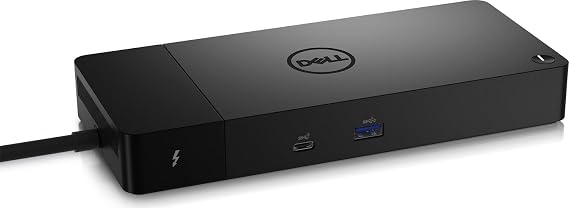
Dell ThunderBolt 4 Dock (WD22TB4), Black
รายการ #:
59914905
THB 7223
รายละเอียดราคา
ไม่รวมค่าจัดส่งและค่าธรรมเนียมศุลกากร ( ค่าจัดส่งและค่าธรรมเนียมศุลกากรจะคำนวณตอนชำระเงิน )
*สินค้าทั้งหมดจะนำเข้าจาก สหรัฐอเมริกา
0 ratings
เขียนรีวิว
มีสินค้า
 นำเข้าจาก USA ร้านค้า
สั่งซื้อตอนนี้และรับสินค้าประมาณ วันศุกร์, กันยายน 11
การทำธุรกรรมที่ปลอดภัย
Ubuy ทำงานอย่างหนักเพื่อปกป้องความปลอดภัยและความเป็นส่วนตัวของคุณ ระบบรักษาความปลอดภัยการชำระเงินขั้นสูงของเราช่วยให้ข้อมูลของคุณเป็นความลับ โดยการเข้ารหัสข้อมูลระหว่างการส่งโดยใช้โปรโตคอล AES (Advanced Encryption Standards) และ SSL (Secure Socket Layer) รายละเอียดการชำระเงินของคุณปลอดภัย 100% เนื่องจากเราไม่แบ่งปันข้อมูลการชำระเงินของคุณกับผู้ขายบุคคลที่สาม
พันธมิตรด้านโลจิสติกส์ชั้นนำของเรา


Modular Thunderbolt 4 Dock with swappable module capability for easy upgrades and SuperBoost technologies for fast charging

Fast
Shipping

คืนสินค้าฟรี*

แพ็คสินค้าอย่างปลอดภัย

สินค้าแท้ 100%

ผ่านมาตรฐาน PCI DSS

ได้รับการรับรอง ISO 27001












Note: Step Down Voltage Transformer required for using electronics products of สหรัฐอเมริกา store (110-120). Recommended power converters ซื้อเลย.


จุดเด่น
Versatile Connectivity
Offers multiple ports including USB-C, HDMI, and Ethernet, allowing users to connect various devices effortlessly, enhancing productivity for professionals needing extensive connectivity in one dock.
Fast Charging Capability
Delivers up to 90W power delivery for quick device charging, ensuring you stay powered throughout the day without needing multiple adapters, ideal for active users on the go.
Compact Design
Sleek, space-efficient design fits seamlessly in any workspace, providing users with a clutter-free environment while maintaining high functionality, perfect for home and office settings.
รายละเอียดสินค้า
| Hardware Interface | Thunderbolt 4 |
| Compatible Devices | Dell, HDMI, Thunderbolt, USB C, Windows 10 |
| Total Usb Ports | 7 |
| Number of Ports | 11 |
| Total Number of HDMI Ports | 1 |
| Wattage | 180 watts |
| Input Voltage | 230 volts_of_alternating_current |
| Minimum Required Operating System Version | Windows 11 |
| Item Dimensions L x W x H | 9.7"L x 6.5"W x 1.1"H (24.6 x 16.5 x 2.8 cm) |
| Item Weight | 650 g |
| Color | Black |
| Brand | Dell |
| Number of Items | 1 |
| Number of Packs | 1 |
| Global Trade Identification Number | 05397184635629, 05397184718902 |
| Manufacturer | Dell Computers |
| Item Type Name | Doking Station |
| Model Number | DELL-WD22TB4 |
| Mfr Part Number | DELL-WD22TB4 |
| Total USB Ports | 7 |
| Product Dimensions (L x W x H) | 9.7"L x 6.5"W x 1.1"H (24.6 x 16.5 x 2.8 cm) |
| Total HDMI Ports | 1 |
| Country of Origin | This item will be imported from US |
| Date First Available | August 19, 2022 |
| What is in the box | Dell ThunderBolt 4 Dock... For more details, please check description/product details |
เหมาะสำหรับใคร?

-
Business Professionals
Ideal for professionals needing multiple connections for laptops to boost productivity with docking and charging capabilities.
-
Content Creators
Great for video editors and designers who require high-speed data transfer and support for multiple high-resolution displays.
-
Remote Workers
Perfect for remote employees who need a versatile docking solution for seamless connectivity to various peripherals at home.

-
Casual Users
Individuals who simply use laptops for basic tasks may find the dock excessively advanced and overpriced for their needs.
ข้อมูลผลิตภัณฑ์
Dell ThunderBolt 4 Dock (WD22TB4), Black
มีข้อสงสัย? คุยกับเรา
คำถามและคำตอบของลูกค้า
-
คำถาม:
What are the key features of the Dell ThunderBolt 4 Dock WD22TB4?
คำตอบ: The Dell ThunderBolt 4 Dock WD22TB4 boasts crucial features like dual 4K display support, multiple USB-C and USB-A ports, and a 90W power delivery capability. This dock enhances your workspace by allowing you to connect up to three displays and a variety of peripherals—all while ensuring a single, powerful connection to your laptop. It's particularly useful for professionals engaged in graphic design or video editing who need high-resolution displays. -
คำถาม:
Is the Dell ThunderBolt 4 Dock WD22TB4 compatible with all laptops?
คำตอบ: While the Dell ThunderBolt 4 Dock WD22TB4 is primarily designed for Thunderbolt 4 and USB-C compatible laptops, it may also work with USB-C devices, although with limited functionality. To ensure maximum performance and access to all features, utilizing a Thunderbolt 4 device is recommended. This compatibility is essential for users who mix work with various devices, as it guarantees seamless connectivity. -
คำถาม:
How does the Dell ThunderBolt 4 Dock WD22TB4 improve workflow for remote workers?
คำตอบ: The Dell ThunderBolt 4 Dock WD22TB4 significantly enhances workflow by offering multiple connectivity options that simplify the setup process. Users can connect their laptop, keyboard, mouse, external drives, and dual monitors through a single cable. This consolidation helps in creating a clean and organized workspace, which is excellent for remote workers who need to switch between different tasks rapidly. -
คำถาม:
Can I charge my laptop using the Dell ThunderBolt 4 Dock WD22TB4?
คำตอบ: Yes, the Dell ThunderBolt 4 Dock WD22TB4 supports charging through its USB-C connection, providing up to 90W of power delivery to compatible laptops. This feature greatly reduces the need for multiple chargers and keeps your workspace uncluttered. It's particularly beneficial for professionals who are often on the move and need a single docking solution that both powers and connects all their devices. -
คำถาม:
What types of ports does the Dell ThunderBolt 4 Dock WD22TB4 have?
คำตอบ: The Dell ThunderBolt 4 Dock WD22TB4 incorporates a variety of ports, including USB-C Thunderbolt 4 ports, USB-A ports, an HDMI port, and an audio output jack. This extensive selection allows for diverse peripheral connections, catering to the needs of creative professionals who may require audio interfaces, additional storage, or multiple monitors for their work. -
คำถาม:
How can I set up multiple displays with the Dell ThunderBolt 4 Dock WD22TB4?
คำตอบ: Setting up multiple displays with the Dell ThunderBolt 4 Dock WD22TB4 is straightforward. You can connect up to two 4K monitors via the dock using its HDMI and DisplayPort outputs. Simply connect your monitors to the respective ports and switch your laptop display settings to 'Extend' for a seamless multi-monitor experience. This is particularly beneficial for professionals who require extensive screen real estate for multitasking. -
คำถาม:
Does the Dell ThunderBolt 4 Dock WD22TB4 support data transfer?
คำตอบ: Absolutely! The Dell ThunderBolt 4 Dock WD22TB4 supports high-speed data transfer through its multiple USB ports, allowing you to quickly transfer files to and from external drives. The dock is ideal for users who work with large files, such as video editors or graphic designers, as it ensures efficient data handling while also connecting all your devices through one hub. -
คำถาม:
What is the maximum resolution supported by the Dell ThunderBolt 4 Dock WD22TB4?
คำตอบ: The maximum resolution supported by the Dell ThunderBolt 4 Dock WD22TB4 is dual 4K at 60Hz. This capability is crucial for professionals who depend on high-fidelity visuals, such as video editors or software developers. The dock ensures that your visuals remain sharp and vibrant, which can enhance your viewing experience and improve productivity. -
คำถาม:
Can the Dell ThunderBolt 4 Dock WD22TB4 be used with gaming laptops?
คำตอบ: Yes, the Dell ThunderBolt 4 Dock WD22TB4 can be used with gaming laptops that feature Thunderbolt 4 or USB-C ports. It allows gamers to connect external displays and peripherals while providing a robust power supply. This makes it an attractive option for gamers who want to streamline their setup without sacrificing performance. -
คำถาม:
Where can I buy the Dell ThunderBolt 4 Dock WD22TB4?
คำตอบ: You can purchase the Dell ThunderBolt 4 Dock WD22TB4 at Ubuy. Ubuy offers a reliable platform where you can find this product along with detailed descriptions and customer reviews to help inform your buying decision.
Dell Docking Stations DELL-WD22TB4 Editorial Review
Dell ThunderBolt 4 Dock (WD22TB4), Black is a powerful docking station designed to enhance connectivity for Dell laptops and other compatible devices. With a total of 11 ports, including 7 USB ports and 1 HDMI port, it supports running dual monitors and provides fast charging capabilities. Users have appreciated its ability to connect multiple devices seamlessly, running a portable office from anywhere. However, some customers have experienced issues with used units being sold as new and noted that it lacks sufficient USB-A ports. It's essential to ensure compatibility, particularly that your laptop supports Thunderbolt 3 or 4 for optimal performance.
ความคิดเห็นและคะแนนจากลูกค้า
1 การให้คะแนนของลูกค้า
-
5 ดาว
100%
-
4 ดาว
0%
-
3 ดาว
0%
-
2 ดาว
0%
-
1 ดาว
0%
แบ่งปันความคิดของคุณกับลูกค้าท่านอื่น
แชร์ความคิดของคุณกับลูกค้ารายอื่น
ข้อดี
- Supports dual monitors effortlessly
- Seamless connectivity for multiple devices
- Fast charging capabilities for laptops
- Compact design with lightweight build
- Compatible with a variety of devices
ข้อเสีย
- Limited USB-A ports may require additional adapters
ความน่าเชื่อถือของแพลตฟอร์ม

JG
Jazz
ผู้ซื้อที่ยืนยันแล้ว
“Easy to use and always helpful and sorts any issues I've had past and present”
1 September 2026 · ผ่าน Trustpilot
EK
Emmanuel
ผู้ซื้อที่ยืนยันแล้ว
“I always receive support when I engage customer service. Overall my experience with UBUY has been top notch. Keep up the good work.”
31 August 2026 · ผ่าน Trustpilot
F
fnd
ผู้ซื้อที่ยืนยันแล้ว
“The delivery was fast and the product came undamaged and authentic.”
29 August 2026 · ผ่าน Trustpilot
LC
Leana
ผู้ซื้อที่ยืนยันแล้ว
“Ubuy is extremely efficient and to order online is an easy process. The verity of products to buy is really unlimited! My order was urgent and I got it on time. The products are great! Thank you Ubuy!”
25 August 2026 · ผ่าน Trustpilot
HL
Hengo
ผู้ซื้อที่ยืนยันแล้ว
“Fast, convenient and cheap. Great store!”
27 August 2026 · ผ่าน Trustpilot
การชำระเงินที่มั่นใจได้
จัดส่งทั่วโลก
การคืนสินค้าที่ง่ายดาย
สินค้าของแท้
ประวัติราคาสินค้า
ข้อมูลสำคัญ
- ข้อจำกัด: สำหรับสินค้าที่จัดส่งระหว่างประเทศ โปรดทราบว่าการรับประกันจากผู้ผลิตอาจไม่มีผลบังคับใช้ บริการหลังการขายจากผู้ผลิตอาจไม่สามารถใช้งานได้ คู่มือผลิตภัณฑ์ คำแนะนำการใช้งาน และคำเตือนด้านความปลอดภัยอาจไม่ได้จัดทำเป็นภาษาของประเทศปลายทาง สินค้า (รวมถึงเอกสารประกอบ) อาจไม่ได้ออกแบบให้สอดคล้องกับมาตรฐาน ข้อกำหนด และข้อบังคับด้านฉลากของประเทศปลายทาง และสินค้าอาจไม่สอดคล้องกับแรงดันไฟฟ้าและมาตรฐานทางไฟฟ้าอื่น ๆ ของประเทศปลายทาง (ซึ่งอาจต้องใช้ปลั๊กแปลงไฟหรือเครื่องแปลงแรงดันไฟฟ้าตามความเหมาะสม) ผู้รับสินค้ามีหน้าที่รับผิดชอบในการตรวจสอบว่าสินค้าดังกล่าวสามารถนำเข้าประเทศปลายทางได้อย่างถูกต้องตามกฎหมาย เมื่อสั่งซื้อสินค้าจาก Ubuy หรือบริษัทในเครือ ผู้รับสินค้าจะถือเป็นผู้นำเข้าตามกฎหมาย (Importer of Record) และต้องปฏิบัติตามกฎหมายและข้อบังคับทั้งหมดของประเทศปลายทาง
- ผลิตภัณฑ์บางรายการใน Ubuy ไม่ได้มีไว้เพื่อขาย เนื่องจาก Ubuy เป็นเครื่องมือค้นหาระดับโลก ผลิตภัณฑ์อยู่ภายใต้กฎระเบียบด้าน การส่งออก/การค้า
THB 7223
สั่งซื้อตอนนี้และรับสินค้าประมาณ วันศุกร์, กันยายน 11
สินค้านี้ไม่ถูกจำกัดในประเทศของฉัน (หากสินค้านี้ไม่ถูกจำกัดในประเทศของคุณ กรุณาคลิกลิงก์ด้านบน ทีมงานของเราจะตรวจสอบและเปิดให้สั่งซื้อ)
จำนวน:
การทำธุรกรรมที่ปลอดภัย
ได้รับการรับรอง PCI DSS และ ISO 27001:2022 พร้อมการชำระเงินแบบเข้ารหัสและการคุ้มครองผู้ซื้อเต็มรูปแบบทุกคำสั่งซื้อ
พันธมิตรด้านโลจิสติกส์ชั้นนำของเรา
การจัดส่งข้ามพรมแดนที่เร็วที่สุด
คุณสมบัติและประโยชน์
- Connect displays and peripherals to your system with a single cable for ultimate productivity
- Highest number of ports connects multiple 4k displays
- Fast Data Transfer of 40 GB/s
การรับประกันจาก Ubuy
ช้อปสบายใจไร้กังวล ด้วยสินค้าของแท้ 100% ระบบชำระเงินปลอดภัยได้มาตรฐาน PCI DSS การปกป้องข้อมูลด้วยมาตรฐาน ISO 27001 การจัดส่งข้ามพรมแดนที่รวดเร็วที่สุด คืนสินค้าฟรี และบรรจุภัณฑ์ที่ปลอดภัยในทุกคำสั่งซื้อ*