- หน้าแรก /
- อิเล็กทรอนิกส์ /
- อุปกรณ์เสริมคอมพิวเตอร์ /
- อุปกรณ์เสริมแล็ปท็อป /
- ด็อกกิ้งสเตชันสำหรับแล็ปท็อป /
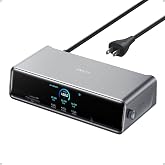
- IOGEAR Dock PRO Duo USB Type-C Docking Statio...










รายการ #:
94146143
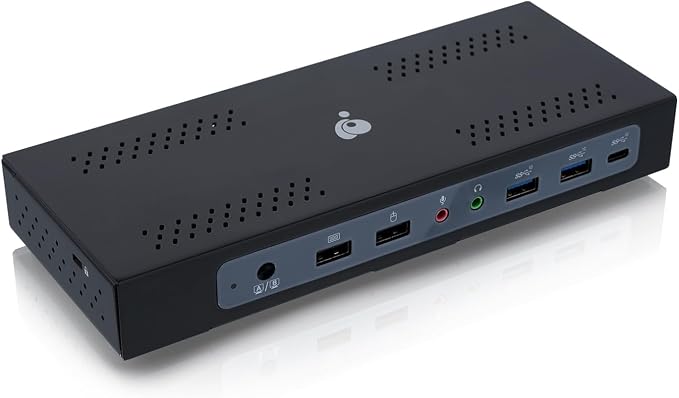
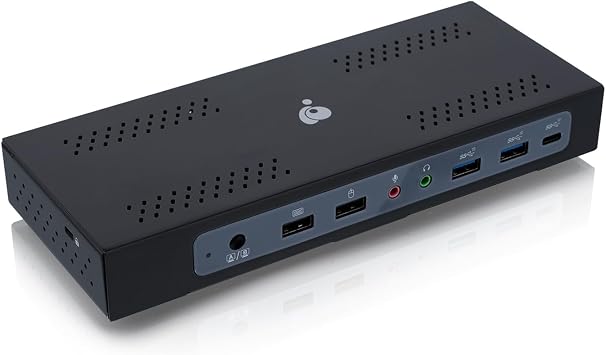
IOGEAR Dock PRO Duo USB Type-C Docking Station
รายการ #:
94146143
THB 10416
รายละเอียดราคา
ไม่รวมค่าจัดส่งและค่าธรรมเนียมศุลกากร ( ค่าจัดส่งและค่าธรรมเนียมศุลกากรจะคำนวณตอนชำระเงิน )
*สินค้าทั้งหมดจะนำเข้าจาก สหรัฐอเมริกา
0 ratings
เขียนรีวิว
มีสินค้า
 นำเข้าจาก USA ร้านค้า
จำนวน:
เหลือเพียง 4 รายการในสต็อก
สั่งซื้อตอนนี้และรับสินค้าประมาณ วันพุธ, พฤศจิกายน 18
การทำธุรกรรมที่ปลอดภัย
Ubuy ทำงานอย่างหนักเพื่อปกป้องความปลอดภัยและความเป็นส่วนตัวของคุณ ระบบรักษาความปลอดภัยการชำระเงินขั้นสูงของเราช่วยให้ข้อมูลของคุณเป็นความลับ โดยการเข้ารหัสข้อมูลระหว่างการส่งโดยใช้โปรโตคอล AES (Advanced Encryption Standards) และ SSL (Secure Socket Layer) รายละเอียดการชำระเงินของคุณปลอดภัย 100% เนื่องจากเราไม่แบ่งปันข้อมูลการชำระเงินของคุณกับผู้ขายบุคคลที่สาม
พันธมิตรด้านโลจิสติกส์ชั้นนำของเรา


Fast
Shipping

คืนสินค้าฟรี*

แพ็คสินค้าอย่างปลอดภัย

สินค้าแท้ 100%

ผ่านมาตรฐาน PCI DSS

ได้รับการรับรอง ISO 27001












Note: Step Down Voltage Transformer required for using electronics products of สหรัฐอเมริกา store (110 V-120 V). Recommended power converters ซื้อเลย.


จุดเด่น
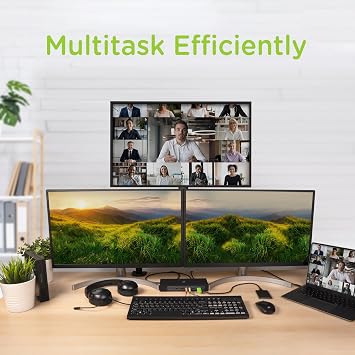
Dual Display Support
Seamlessly connect two external monitors with 4K resolution, enhancing productivity for multi-taskers and professionals needing expansive digital workspace.
Wide Compatibility
TAA compliance ensures compatibility with government and corporate environments, making it the ideal choice for businesses that require reliable and approved technology solutions.
Versatile Connectivity
Features multiple USB ports and HDMI outputs, providing extensive connectivity options for various devices, thus addressing diverse user needs for streamlined operations.
รายละเอียดสินค้า
| Hardware Interface | USB |
| Compatible Devices | USB-C compatible laptops, smartphones, tablets, and other handheld devices running on Windows and Mac OS platforms |
| Total Usb Ports | 7 |
| Number of Ports | 2 |
| Total Number of HDMI Ports | 1 |
| Wattage | 230 watts |
| Item Dimensions L x W x H | 11.8"L x 13.7"W x 12.5"H (30 x 34.8 x 31.8 cm) |
| Item Weight | 1.5 pounds (680 grams) |
| Color | HDMI/DisplayPort - TAA |
| Brand | IOGEAR |
| Number of Items | 1 |
| Global Trade Identification Number | 00881317521682 |
| Unit Count | 1 Count |
| UPC | 881317521682 |
| Manufacturer | IOGEAR |
| Built-In Media | Item |
| Model Number | GUD3CDHTAA |
| Mfr Part Number | GUD3CDHTAA |
| Compatible Devices | USB-C compatible laptops, smartphones, tablets, and other handheld devices running on Windows and Mac OS platforms See more |
| Total USB Ports | 7 |
| Product Dimensions (L x W x H) | 11.8"L x 13.7"W x 12.5"H (30 x 34.8 x 31.8 cm) |
| Total HDMI Ports | 1 |
สิ่งที่อยู่ในกล่อง
Item
เหมาะสำหรับใคร?

-
Remote Workers
Ideal for remote professionals needing multiple USB ports and display outputs for efficient home office setups.
-
Tech Enthusiasts
Great for users who require versatile connectivity options for various devices and peripherals simultaneously.
-
Business Use
Suitable for businesses requiring TAA compliance for government contracts, ensuring compatibility with specific regulations.

-
Casual Users
Casual users may find advanced features excessive and may prefer simpler solutions for basic connectivity needs.
ข้อมูลผลิตภัณฑ์
มีข้อสงสัย? คุยกับเรา
คำถามและคำตอบของลูกค้า
-
คำถาม:
จะซื้อ IOGEAR Dock PRO Duo USB Type-C Docking Station ทางออนไลน์จาก Ubuy ได้อย่างไร
คำตอบ: ซื้อสินค้า IOGEAR Dock PRO Duo USB Type-C Docking Station ทางออนไลน์จาก Ubuy ได้ง่ายๆ. คุณเพียงแค่ต้องค้นหาสินค้า เลือกวิธีการจัดส่งของคุณในขณะที่ทำการชำระเงิน และส่งไปยังสถานที่ของคุณ -
คำถาม:
IOGEAR Dock PRO Duo USB Type-C Docking Station มีให้ช็อปออนไลน์ใน Thailand หรือไม่
คำตอบ: ใช่ ที่ Ubuy Thailand ผลิตภัณฑ์นี้มีให้คุณเลือกซื้อในราคาที่เหมาะสม. IOGEAR Dock PRO Duo USB Type-C Docking Station ไม่มีให้บริการในพื้นที่ แต่คุณสามารถไว้วางใจเราด้วยบริการจัดส่งด่วนของเรา -
คำถาม:
ใช้เวลานานแค่ไหนในการรับสินค้าหลังจากทำการสั่งซื้อ?
คำตอบ: เวลาจัดส่งของผลิตภัณฑ์ที่คุณสั่งซื้อจะแตกต่างกันไปตามสิ่งที่คุณสั่งซื้อและวิธีการจัดส่งที่คุณเลือก. เวลาจัดส่งโดยประมาณจะระบุไว้ในขั้นตอนการชำระเงิน ดังนั้นโปรดอย่ากังวลขณะช้อปปิ้ง
IOGEAR Docking Stations GUD3CDHTAA Editorial Review
The IOGEAR Dock Pro Duo USB-C Docking Station has garnered a mix of reviews from users with various setups, mainly for its utility in connecting multiple devices and displays. A common theme among reviewers is the dock's capability to seamlessly switch between two laptops, which is especially beneficial for users juggling between work and personal devices. Its efficacy was noted by users who successfully connected a setup featuring three displays, a webcam, and various peripherals like keyboards and mice. One major highlight of the dock is its compatibility with both Windows and macOS systems, allowing for versatile use—in particular, it works well with the MacBook when the DisplayLink software is used, although some users have reported frequent power issues and disconnections when the MacBook lid is closed. On Windows systems, users typically found more straightforward functionality without the need for additional drivers. However, the dock is not without its drawbacks. Some users experienced Considerable display lag, particularly with DisplayPort outputs during gaming, which was a significant concern for those utilizing high-performance laptops like the Razer gaming machine. Switching between different computer configurations also requires a couple of button presses, which might confuse some users, especially because the dock doesn’t have separate port options for each monitor. This has drawn criticism for its limited flexibility in display port management. Overall, the IOGEAR Dock Pro Duo stands out for its design and manageability of multiple devices, but potential buyers should weigh the quirks and issues reported by existing users. There is a strong appreciation for the streamlined connectivity it offers, but quickly addressing compatibility and performance limitations is essential for maximizing the user experience. **
ความคิดเห็นและคะแนนจากลูกค้า
8 การให้คะแนนของลูกค้า
-
5 ดาว
42%
-
4 ดาว
24%
-
3 ดาว
19%
-
2 ดาว
15%
-
1 ดาว
0%
แบ่งปันความคิดของคุณกับลูกค้าท่านอื่น
แชร์ความคิดของคุณกับลูกค้ารายอื่น
ข้อดี
- Supports multiple displays with both PC and Mac.
- Efficient laptop switching without the need to plug/unplug cables.
- Full metal housing design feels sturdy and reliable.
- Good compatibility with peripheral devices.
ข้อเสีย
- Limited port choice for different monitor connections (specific to ports available).
ความน่าเชื่อถือของแพลตฟอร์ม

FK
Fatuma
ผู้ซื้อที่ยืนยันแล้ว
“My experience was great I really liked the fact that i get my order delivered within the days promised. The packaging , the product, shipment everything was so good, trustworthy and fast. Definitely will shop again”
28 October 2026 · ผ่าน Trustpilot
JC
Jane
ผู้ซื้อที่ยืนยันแล้ว
“Very easy to order. The product was good quality. The delivery service was excellent, updates given so you knew what was happening.”
30 October 2026 · ผ่าน Trustpilot
R
Roman
ผู้ซื้อที่ยืนยันแล้ว
“Good experience The product I ordered came as expected. What most impressed me in dealing with Ubuy is the communication and updates I received through the process. I knew exactly where and when my item was at all times until delivery. Well done!”
31 October 2026 · ผ่าน Trustpilot
SH
SJ Hong
ผู้ซื้อที่ยืนยันแล้ว
“The package came very quickly and the shipping fee was extremely reasonable! Overall, the service as well as my experience of ordering from Ubuy was a very pleasant experience! Thank you so much!”
31 October 2026 · ผ่าน Trustpilot
SH
Szilvia
ผู้ซื้อที่ยืนยันแล้ว
“Great service. Ordered an item coming from the USA which wasn't available in Ireland or even for delivery from the retailer and it had arrived within a few days. Very happy with the product and the service.”
31 October 2026 · ผ่าน Trustpilot
ทำไมต้องช้อปกับเรา
การชำระเงินที่มั่นใจได้
จัดส่งทั่วโลก
การคืนสินค้าที่ง่ายดาย
สินค้าของแท้
Customers also viewed these products
ประวัติราคาสินค้า
ข้อมูลสำคัญ
- ข้อจำกัด: สำหรับสินค้าที่จัดส่งระหว่างประเทศ โปรดทราบว่าการรับประกันจากผู้ผลิตอาจไม่มีผลบังคับใช้ บริการหลังการขายจากผู้ผลิตอาจไม่สามารถใช้งานได้ คู่มือผลิตภัณฑ์ คำแนะนำการใช้งาน และคำเตือนด้านความปลอดภัยอาจไม่ได้จัดทำเป็นภาษาของประเทศปลายทาง สินค้า (รวมถึงเอกสารประกอบ) อาจไม่ได้ออกแบบให้สอดคล้องกับมาตรฐาน ข้อกำหนด และข้อบังคับด้านฉลากของประเทศปลายทาง และสินค้าอาจไม่สอดคล้องกับแรงดันไฟฟ้าและมาตรฐานทางไฟฟ้าอื่น ๆ ของประเทศปลายทาง (ซึ่งอาจต้องใช้ปลั๊กแปลงไฟหรือเครื่องแปลงแรงดันไฟฟ้าตามความเหมาะสม) ผู้รับสินค้ามีหน้าที่รับผิดชอบในการตรวจสอบว่าสินค้าดังกล่าวสามารถนำเข้าประเทศปลายทางได้อย่างถูกต้องตามกฎหมาย เมื่อสั่งซื้อสินค้าจาก Ubuy หรือบริษัทในเครือ ผู้รับสินค้าจะถือเป็นผู้นำเข้าตามกฎหมาย (Importer of Record) และต้องปฏิบัติตามกฎหมายและข้อบังคับทั้งหมดของประเทศปลายทาง
- ผลิตภัณฑ์บางรายการใน Ubuy ไม่ได้มีไว้เพื่อขาย เนื่องจาก Ubuy เป็นเครื่องมือค้นหาระดับโลก ผลิตภัณฑ์อยู่ภายใต้กฎระเบียบด้าน การส่งออก/การค้า
THB 10416
สั่งซื้อตอนนี้และรับสินค้าประมาณ วันพุธ, พฤศจิกายน 18
สินค้านี้ไม่ถูกจำกัดในประเทศของฉัน (หากสินค้านี้ไม่ถูกจำกัดในประเทศของคุณ กรุณาคลิกลิงก์ด้านบน ทีมงานของเราจะตรวจสอบและเปิดให้สั่งซื้อ)
จำนวน:
เหลือเพียง 4 รายการในสต็อก
การทำธุรกรรมที่ปลอดภัย
ได้รับการรับรอง PCI DSS และ ISO 27001:2022 พร้อมการชำระเงินแบบเข้ารหัสและการคุ้มครองผู้ซื้อเต็มรูปแบบทุกคำสั่งซื้อ
พันธมิตรด้านโลจิสติกส์ชั้นนำของเรา
การจัดส่งข้ามพรมแดนที่เร็วที่สุด
การรับประกันจาก Ubuy
ช้อปสบายใจไร้กังวล ด้วยสินค้าของแท้ 100% ระบบชำระเงินปลอดภัยได้มาตรฐาน PCI DSS การปกป้องข้อมูลด้วยมาตรฐาน ISO 27001 การจัดส่งข้ามพรมแดนที่รวดเร็วที่สุด คืนสินค้าฟรี และบรรจุภัณฑ์ที่ปลอดภัยในทุกคำสั่งซื้อ*