- หน้าแรก /
- อิเล็กทรอนิกส์ /
- Home Audio /
- Home Audio Accessories /
- Distribution /
- Selector Switch Boxes /
- Osee GoStream Deck Pro HDMI Live Stream Switc...


รายการ #:
77675051
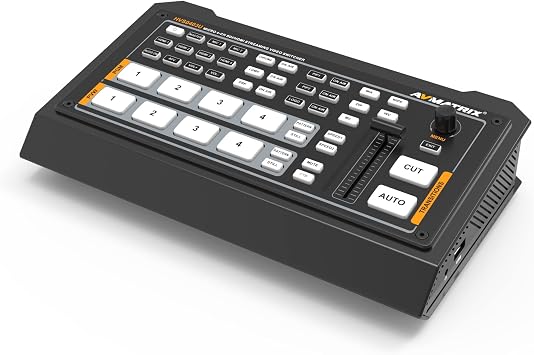
Osee GoStream Deck Pro HDMI Live Stream Switcher, Video Mixer Switcher 6 HDMI, 2 USB, 8 Macro Buttons, MultiSource, Three Streams Simultaneously,
รายการ #:
77675051
THB 13246
Price Details
Excluding Shipping & Custom charges ( Shipping and custom charges will be calculated on checkout )
*All items will import from สหรัฐอเมริกา
0 ratings
เขียนรีวิว
มีสินค้า
 นำเข้าจาก USA ร้านค้า
QTY:
สั่งซื้อตอนนี้และรับสินค้าประมาณ วันพฤหัสบดี, สิงหาคม 06
การทำธุรกรรมที่ปลอดภัย
Ubuy ทำงานอย่างหนักเพื่อปกป้องความปลอดภัยและความเป็นส่วนตัวของคุณ ระบบรักษาความปลอดภัยการชำระเงินขั้นสูงของเราช่วยให้ข้อมูลของคุณเป็นความลับ โดยการเข้ารหัสข้อมูลระหว่างการส่งโดยใช้โปรโตคอล AES (Advanced Encryption Standards) และ SSL (Secure Socket Layer) รายละเอียดการชำระเงินของคุณปลอดภัย 100% เนื่องจากเราไม่แบ่งปันข้อมูลการชำระเงินของคุณกับผู้ขายบุคคลที่สาม
พันธมิตรด้านโลจิสติกส์ชั้นนำของเรา


Unparalleled super source function for dynamic and engaging visual content

Fast
Shipping

คืนสินค้าฟรี*

แพ็คสินค้าอย่างปลอดภัย

สินค้าแท้ 100%

PCI DSS Compliance

ISO 27001 Certified


Note: Step Down Voltage Transformer required for using electronics products of สหรัฐอเมริกา store (110-120). Recommended power converters ซื้อเลย.


จุดเด่น
Multiple Inputs
With 6 HDMI and 2 USB inputs, this switcher allows seamless integration of various video sources, enhancing live streaming setups without the need for extra equipment.
Simultaneous Streaming
Stream three different outputs at once, making it effortless to engage different audience segments simultaneously, while maximizing reach and interaction during live broadcasts.
Custom Macros
Eight programmable macro buttons enable quick transitions and custom commands, simplifying the production process and enhancing the creativity of live events and presentations.
รายละเอียดสินค้า
| Item Weight | 4.1 lbs (1.86 kg) |
เหมาะสำหรับใคร?

-
Live Streamers
Ideal for creators needing to manage multiple video sources seamlessly during live broadcasts, enhancing viewer engagement.
-
Event Producers
Perfect for professionals managing live events, allowing for smooth transitions and the presentation of various video feeds.
-
Content Creators
Great for YouTubers or podcasters who want advanced video production features to elevate their content quality significantly.

-
Beginners
Overly complex for novice users, requiring advanced technical skills that may discourage those new to video production.
ข้อมูลผลิตภัณฑ์
Osee GoStream Deck Pro HDMI Live Stream Switcher, Video Mixer Switcher 6 HDMI, 2 USB, 8 Macro Buttons, MultiSource, Three Streams Simultaneously, Phone Out, UVC & NDI Updatable
About This Item
Introducing the Osee GoStream Deck Pro, the ultimate portable multi-format live streaming video mixer switcher. With its unrivaled versatility and advanced features, this deck is a game-changer for content creation and seamless live streaming. Equipped with 6 HDMI and 2 USB ports, the Osee GoStream Deck Pro allows you to connect multiple devices simultaneously, providing a hassle-free workflow. Whether you're a professional content creator or an e-commerce enthusiast, this powerful tool will elevate your production quality to new heights. Designed with ease of use in mind, the Osee GoStream Deck Pro offers intuitive controls and a user-friendly interface.
You can effortlessly switch between different sources, adjust audio levels, and control various aspects of your live stream, giving you full control over your content creation process. One of the standout features of the Osee GoStream Deck Pro is its NDI updatable capabilities. This means that you can easily update the device with the latest NDI technology, ensuring compatibility with the latest streaming standards and future-proofing your investment. But the Osee GoStream Deck Pro is not just about functionality, it also delivers impeccable performance. With its advanced processing power, this deck allows for seamless video transitions, smooth audio mixing, and crystal-clear visuals, ensuring that your audience gets the best streaming experience possible. In addition to its impressive performance, the Osee GoStream Deck Pro offers a range of benefits.
From its compact and portable design to its robust construction, this deck is built to withstand the demands of professional use. Plus, its compatibility with popular streaming platforms and software makes it an ideal choice for any content creator or streaming enthusiast. So why wait? Experience the power and convenience of the Osee GoStream Deck Pro and take your live streaming to the next level. With its advanced features, intuitive controls, and exceptional performance, this deck is a must-have for anyone serious about content creation and e-commerce.
Buy online now and unlock endless possibilities for your streaming journey.
มีข้อสงสัย? คุยกับเรา
การค้นหาที่เกี่ยวข้อง
คําถามและคําตอบของลูกค้า
-
คำถาม:
What is the Osee GoStream Deck Pro and its main features?
คำตอบ: The Osee GoStream Deck Pro is a versatile HDMI live stream switcher combining video mixer capabilities with a user-friendly interface. It features 6 HDMI inputs, 2 USB ports, and 8 programmable macro buttons to streamline your streaming workflow. This device allows you to manage multiple sources, enabling you to produce engaging live broadcasts across three streams simultaneously. It's ideal for professional streamers, content creators, and broadcasters looking for an efficient tool to enhance their live production quality. -
คำถาม:
How does the multi-source capability work with the Osee GoStream Deck Pro?
คำตอบ: The multi-source capability of the Osee GoStream Deck Pro enables you to connect and switch between multiple HDMI sources effortlessly. Whether you're streaming video games, live events, or presentations, you can easily manage up to 6 HDMI inputs, allowing for seamless transitions. This feature ensures that you can create dynamic content that keeps your audience engaged without the pauses typically associated with input changes. It's particularly useful for gamers and educators who frequently switch content during a livestream. -
คำถาม:
Can I customize the macro buttons on the Osee GoStream Deck Pro?
คำตอบ: Yes, the 8 macro buttons on the Osee GoStream Deck Pro can be fully customized to suit your specific needs. You can assign different functions to these buttons, such as switching scenes, starting video playback, or even triggering overlays. This level of customization makes the switcher an effective tool for enhancing your live stream's interactivity. For instance, a gaming broadcaster could program buttons to quickly switch between different camera angles, enhancing viewer engagement during live gameplay. -
คำถาม:
Is the Osee GoStream Deck Pro suitable for beginners?
คำตอบ: Absolutely! While the Osee GoStream Deck Pro is packed with professional features, its intuitive design makes it accessible even for beginners. The straightforward interface and the ability to customize macro buttons allow novice streamers to set up their live productions without a steep learning curve. Several tutorials and community forums are available to help new users explore its functions. This makes it a great choice for anyone starting their journey in live streaming. -
คำถาม:
What types of devices can be connected to the Osee GoStream Deck Pro?
คำตอบ: The Osee GoStream Deck Pro supports a wide array of devices due to its multiple HDMI and USB inputs. You can connect cameras, gaming consoles, computers, or even other video sources. The versatility of input options allows users to create a hybrid broadcasting setup. For example, a content creator could use a camera for live interviews, a console for gaming, and a computer for presentations all at once, enriching the viewing experience for their audience. -
คำถาม:
Can I live stream with the Osee GoStream Deck Pro?
คำตอบ: Yes, the Osee GoStream Deck Pro is designed for live streaming. Its capabilities allow you to manage multiple video sources and switch between them during a live broadcast seamlessly. With the ability to process three streams simultaneously, it is perfect for professional live events, multi-camera setups, or interactive sessions. This feature allows streamers to engage with their audience and deliver high-quality content without interruptions. -
คำถาม:
What are the advantages of using HDMI versus USB for connecting devices?
คำตอบ: Using HDMI connections with the Osee GoStream Deck Pro typically provides better video quality and lower latency compared to USB connections. HDMI supports higher resolutions and is designed for video transmission, making it ideal for high-definition broadcasts. While USB inputs are useful for connecting various input devices like webcams and microphones, HDMI should be prioritized for cameras and gaming systems to ensure the best possible streaming experience, particularly for professional content creators. -
คำถาม:
How can I set up the Osee GoStream Deck Pro for a live event?
คำตอบ: Setting up the Osee GoStream Deck Pro for a live event involves connecting your HDMI sources and configuring the settings according to your needs. Begin by selecting your camera and any other video sources you wish to include. Use the macro buttons to assign functions for quick access. Preparing preset scenes ahead of time can help streamline transitions. Test your setup before going live to ensure everything operates smoothly, allowing you to fully engage your audience during the event. -
คำถาม:
What software is compatible with the Osee GoStream Deck Pro?
คำตอบ: The Osee GoStream Deck Pro is compatible with various streaming software, including OBS Studio, Streamlabs, and XSplit. This compatibility allows for enhanced functionality and provides users the flexibility to use their preferred broadcasting software. By integrating with these platforms, you can utilize features like overlays, transitions, and audience interaction tools. This synergy helps content creators deliver high-quality, interactive streams with minimal hassle. -
คำถาม:
Where can I buy the Osee GoStream Deck Pro?
คำตอบ: You can purchase the Osee GoStream Deck Pro from Ubuy in Thailand. Ubuy offers a reliable shopping experience with various options for this high-quality live stream switcher. You can find competitive pricing and detailed product information to help inform your decision. Ubuy is known for its customer service and efficient order processing, making it a great choice for your shopping needs.
osee Selector Switch Boxes Editorial Review
ไม่พบบทวิจารณ์ด้านบรรณาธิการ
ความคิดเห็นและคะแนนจากลูกค้า
1 การให้คะแนนของลูกค้า
-
5 ดาว
0%
-
4 ดาว
100%
-
3 ดาว
0%
-
2 ดาว
0%
-
1 ดาว
0%
แบ่งปันความคิดของคุณกับลูกค้าท่านอื่น
แชร์ความคิดของคุณกับลูกค้ารายอื่น
Platform Trust & Buyer Confidence

MA
Mohammad
Verified buyer
“Excellent quality and original too,when ubuy send original things I will appreciate that ,I very satisfied thank you”
23 July 2026 · via Trustpilot
CK
Chitra
Verified buyer
“The order and delivery progress was communicated very well. Package arrived within the estimated time. Products arrived as expected in good condition.”
22-Jul-26 · via Trustpilot
K
kund
Verified buyer
“Good supply of products. Safe payment methods, and shipment worldwide! Genuine products.”
23-Jul-26 · via Trustpilot
OO
Onesi
Verified buyer
“Was my first time buying a product from Ubuy, but I found it so helpful. This is reliable. Gonna place a new order!”
22 July 2026 · via Trustpilot
SJ
SAO JOHN
Verified buyer
“Ubuy is a great online platform to buy stuff. Reliable, fast delivery time and great value for money. I've been using Ubuy online shopping platform for three years now and will continue to do so.”
23 July 2026 · via Trustpilot
การชำระเงินที่มั่นใจได้
Global Delivery
การคืนสินค้าที่ง่ายดาย
Genuine Products
Top selling HDMI Live Stream Switcher in Thailand


Last Updated on June 29, 2026
ประวัติราคาสินค้า
ข้อมูลสำคัญ
- ข้อจำกัด : สำหรับผลิตภัณฑ์ที่จัดส่งระหว่างประเทศ โปรดทราบว่าการรับประกันของผู้ผลิตอาจไม่ถูกต้อง ตัวเลือกบริการของผู้ผลิตอาจไม่สามารถใช้ได้ คู่มือผลิตภัณฑ์ คำแนะนำ และคำเตือนด้านความปลอดภัยอาจไม่เป็นภาษาของประเทศปลายทาง ผลิตภัณฑ์ (และวัสดุประกอบ) อาจไม่ได้รับการออกแบบตามมาตรฐาน คุณลักษณะเฉพาะ และข้อกำหนดเกี่ยวกับการติดฉลากของประเทศปลายทาง และผลิตภัณฑ์อาจใช้แรงดันไฟฟ้าไม่สอดคล้องกับของประเทศปลายทางและมาตรฐานทางไฟฟ้าอื่น ๆ (ต้องใช้อะแดปเตอร์หรือตัวแปลงไฟตามความเหมาะสม) ผู้รับมีหน้าที่ตรวจสอบให้แน่ใจว่าสินค้าสามารถนำเข้าประเทศปลายทางได้อย่างถูกกฎหมาย เมื่อสั่งซื้อจาก Ubuy หรือตัวแทนจำหน่าย ผู้รับคือผู้นำตามกฎหมาย และต้องปฏิบัติตามกฎหมายและระเบียบข้อบังคับทั้งหมดของประเทศปลายทาง
- ผลิตภัณฑ์บางรายการใน Ubuy ไม่ได้มีไว้เพื่อขาย เนื่องจาก Ubuy เป็นเครื่องมือค้นหาระดับโลก ผลิตภัณฑ์อยู่ภายใต้กฎระเบียบด้าน การส่งออก/การค้า
THB 13246
สั่งซื้อตอนนี้และรับสินค้าประมาณ วันพฤหัสบดี, สิงหาคม 06
This item is not restrict in my country.(Please click on above link if this item is not restrict in your country, So our team will review and allow.)
QTY:
การทำธุรกรรมที่ปลอดภัย
PCI DSS compliant and ISO 27001:2022 certified, with encrypted payments and full buyer protection on every order.
พันธมิตรด้านโลจิสติกส์ชั้นนำของเรา
การจัดส่งข้ามประเทศที่รวดเร็วที่สุด
คุณสมบัติและประโยชน์
- Osee GoStream Deck Pro offers unmatched super source function
- Provides dynamic and engaging visual content
- Multiple HDMI and USB ports for maximum flexibility
- Built-in audio mixer and earphone jack monitoring for top-notch audio quality
- Enhanced video effects with chroma keyers, downstream keyers, and upstream keyers
- Upgrading to the newest firmware version is recommended
Ubuy Assurance
Experience worry-free shopping with 100% original products, PCI DSS-compliant payment security, ISO 27001-certified data protection, the fastest cross-border delivery, free returns *, and secure packaging on every order.