- หน้าแรก /
- อิเล็กทรอนิกส์ /
- Computer Accessories /
- Computer Components /
- Computer External Components /
- KVM Switches /
- PiKVM V4 Mini IP KVM
PiKVM V4 Mini IP KVM
THB 12580
Price Details
Excluding Shipping & Custom charges ( Shipping and custom charges will be calculated on checkout )
*All items will import from สหรัฐอเมริกา
Ubuy ทำงานอย่างหนักเพื่อปกป้องความปลอดภัยและความเป็นส่วนตัวของคุณ ระบบรักษาความปลอดภัยการชำระเงินขั้นสูงของเราช่วยให้ข้อมูลของคุณเป็นความลับ โดยการเข้ารหัสข้อมูลระหว่างการส่งโดยใช้โปรโตคอล AES (Advanced Encryption Standards) และ SSL (Secure Socket Layer) รายละเอียดการชำระเงินของคุณปลอดภัย 100% เนื่องจากเราไม่แบ่งปันข้อมูลการชำระเงินของคุณกับผู้ขายบุคคลที่สาม
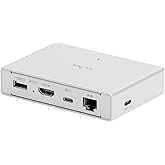
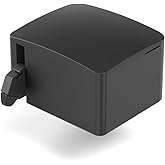
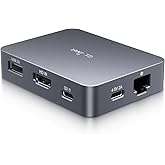
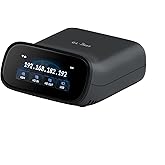
The next generation of Raspberry Pi based KVM over IP. Manage your servers or PC remotely! PiKVM V4 Mini is the compact and budget-friendly version of PiKVM V4 with all the essential features. It is small, cost-effective, and powerful!
Fast
Shipping
คืนสินค้าฟรี*
แพ็คสินค้าอย่างปลอดภัย
สินค้าแท้ 100%
PCI DSS Compliance
ISO 27001 Certified
จุดเด่น
รายละเอียดสินค้า
- The next generation of Raspberry Pi based KVM over IP. Manage your servers or PC remotely! PiKVM is a feature-rich, production grade, open-source, Raspberry Pi based KVM IP device.
- Transfer your mouse and keyboard actions to a remote PC using this remote kvm over ip. Take full control of a remote PC’s power: Pi KVM provides remote reset or reboot using the actual hardware reset & power buttons connector functions.
- Access to all configuration settings of a remote computer like tweaking UEFI/BIOS settings to do some overclocking! Boot a controlled PC using any OS you need using mass storage device emulation support. You can even reinstall the system remotely using this mini kvm!
- PiKVM Fanless design with a passive heatsink for quiet ipkvm operation
- Includes a locator led simplifying your device search.
- Improved power consumption in idle mode: just 2.67 Watts!
| Compatible Devices | Servers, Personal Computers |
| Smart Home Compatibility | Not Smart Home Compatible |
| Item Weight | 0.35 Kilograms |
| Brand | PiKVM |
| Model Name | PiKVM V4 Mini |
| Model Number | PiKVM V4 Mini |
| UPC | 605926258254 |
| Mfr Part Number | 9025 |
| Built-In Media | PiKVM |
| Unit Count | 1.0 Count |
| Manufacturer | PiKVM |
| Number of Items | 1 |
| Package Weight | 3.04 Pound |
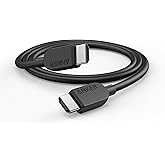
What's in the box
PiKVM
เหมาะสำหรับใคร?
-
System Administrators
Ideal for system administrators needing remote access to monitor and manage servers effectively without physical presence.
-
Tech Support Teams
Perfect for tech support teams providing assistance with hardware diagnostics and resolutions through remote control capabilities.
-
Home Lab Enthusiasts
Great for home lab enthusiasts who want to remotely access and control multiple machines without complex setups.
-
Casual Users
Not suitable for casual users who require simple, straightforward solutions without the need for remote server management.
-
Non-Technical Users
Poor choice for non-technical users unfamiliar with hardware setups and remote desktop configurations.
-
Low Budget Environments
May not be cost-effective for low budget environments seeking minimal solutions without advanced features and functions.
ข้อมูลผลิตภัณฑ์
การค้นหาที่เกี่ยวข้อง
คําถามและคําตอบของลูกค้า
-
คำถาม:
What is the PiKVM V4 Plus and what are its main features?
คำตอบ: The PiKVM V4 Plus is a powerful open-source KVM-over-IP solution that enables remote access and control over devices as if you were physically present. It supports features like USB redirection, HDMI video streaming, and a web-based interface, making it exceptionally versatile. With its ability to work with USB and HDMI ports, users can connect various devices, from servers to desktops, allowing for remote troubleshooting, management, and configuration. Use cases include managing home servers, accessing remote workstations, and providing technical support to users in different locations. -
คำถาม:
How does the PiKVM V4 Plus compare to similar products?
คำตอบ: The PiKVM V4 Plus stands out among similar products due to its flexibility, affordability, and open-source nature. Unlike many commercial KVM solutions, PiKVM allows users to customize and modify the software to fit individual needs. It supports a wide range of configurations, from single-device setups to multi-device networks. Users often appreciate its simplicity, enabling quick setup and integration into existing infrastructure. For instance, IT specialists can seamlessly implement PiKVM in datacenters, while hobbyists might use it for personal projects. -
คำถาม:
What kind of devices can I connect to the PiKVM V4 Plus?
คำตอบ: The PiKVM V4 Plus can connect to a variety of devices including PCs, servers, and any hardware with HDMI output. This flexibility makes it suitable for different applications like managing virtual machines, single-board computers, and even game consoles. Users can leverage it for server maintenance by remotely rebooting or configuring machines without physical access. For example, if a gaming enthusiast has multiple consoles setup, PiKVM allows them to control and switch between consoles from anywhere. -
คำถาม:
Is it difficult to set up the PiKVM V4 Plus?
คำตอบ: Setting up the PiKVM V4 Plus is relatively straightforward, especially for users with some technical knowledge. The installation process involves connecting the device to the HDMI and USB ports of your target hardware, followed by configuring the software using the web interface. The community around PiKVM offers extensive documentation and tutorials that can guide users through the process. Many users find themselves using PiKVM not only for its fundamental functions but also for customizing it to address specific remote management needs. -
คำถาม:
What are the system requirements for the PiKVM V4 Plus?
คำตอบ: To run the PiKVM V4 Plus, you will need a Raspberry Pi board (preferably Pi 4), a microSD card for the operating system, an HDMI cable, and a USB connection to the device you intend to control. The Pi should be connected to a network for web access. This combination of hardware allows users to maximize the performance of PiKVM while ensuring stable connections. This setup can facilitate scenarios such as monitoring server stats in real-time or troubleshooting hardware issues remotely. -
คำถาม:
Does the PiKVM V4 Plus support multiple users?
คำตอบ: Yes, the PiKVM V4 Plus can support multiple users accessing the KVM interface concurrently, provided that proper permissions and configurations are set. This feature is useful in collaborative IT environments where different personnel may need access to the same machines for maintenance, updates, or troubleshooting. For example, in a development team, engineers can independently manage VMs or test environments without stepping on each other's toes, enhancing efficiency and productivity. -
คำถาม:
Can I access the PiKVM V4 Plus remotely?
คำตอบ: Absolutely! The PiKVM V4 Plus is designed for remote access through a web browser, allowing users to connect from anywhere with an internet connection. Once configured correctly, users can control their devices, troubleshoot issues, and perform tasks remotely, making it ideal for IT support or managing remote servers. For instance, remote system administrators can efficiently manage network operations, reducing downtime and increasing responsiveness to unexpected issues. -
คำถาม:
What is the benefit of using an open-source solution like the PiKVM V4 Plus?
คำตอบ: Using an open-source solution like the PiKVM V4 Plus provides flexibility, customizability, and community support that proprietary systems lack. As users can modify the software to cater to their specific needs, it promotes innovation and encourages the sharing of enhancements. Additionally, users benefit from collaboration opportunities with a growing community that shares knowledge and updates. This is particularly beneficial for companies looking to implement a KVM solution that can grow and adapt alongside their ever-changing technological landscape. -
คำถาม:
What is USB redirection in PiKVM V4 Plus?
คำตอบ: USB redirection in PiKVM V4 Plus allows users to connect USB devices from their local machine to a remote target machine. This means you can use USB peripherals like keyboards, mice, or storage devices on a remote system, just as if you were physically present. This feature is vital for tasks such as installing software or transferring files to a remote server. For example, a systems administrator can perform installations or updates remotely without needing physical access to the hardware. -
คำถาม:
Where can I buy PiKVM V4 Plus in Thailand?
คำตอบ: You can buy the PiKVM V4 Plus at Ubuy in Thailand. Ubuy offers a convenient online shopping experience with a wide selection of the latest electronics, making it easy to purchase and explore other related products along with your PiKVM.
PiKVM KVM Switches PiKVM V4 Mini Editorial Review
The PiKVM is a versatile device that allows users to turn their laptop into a KVM for servers. Setting up the PiKVM is relatively easy, typical of the initial setup process for a Raspberry Pi. While the device is on the heavy side for its size, it offers a range of features that make it a great alternative to iDrac or iLO for boards, PCs, and servers without built-in IPMI. Online documentation and previous discussions provide ample support for users looking to maximize the device's capabilities. Customers have found the PiKVM to be useful for handling IPMI tasks on their workstations and for various projects. The device's online documentation is extensive, offering opportunities for customization such as modifying device IDs to enhance functionality. Users have reported using the PiKVM from different locations, including Europe and cruise ships, with Consistent quality and performance. For those looking to work securely while traveling or from remote locations, the PiKVM is highly recommended, with regular updates ensuring it stays up-to-date with ongoing development. Overall, the PiKVM offers a powerful and flexible solution for KVM needs, with an active online community providing valuable resources for users to make the most of the device. **
ความคิดเห็นและคะแนนจากลูกค้า
-
5 ดาว
66%
-
4 ดาว
9%
-
3 ดาว
5%
-
2 ดาว
9%
-
1 ดาว
11%
แบ่งปันความคิดของคุณกับลูกค้าท่านอื่น
แชร์ความคิดของคุณกับลูกค้ารายอื่น
ข้อดี
- Easy setup process
- Extensive online documentation for support and customization
- Versatile features for handling IPMI tasks
- Suitable for remote work with Consistent quality and performance
ข้อเสีย
- Heavier than expected for its size
Top selling PiKVM in Thailand
ประวัติราคาสินค้า
ข้อมูลสำคัญ
- ข้อจำกัด : สำหรับผลิตภัณฑ์ที่จัดส่งระหว่างประเทศ โปรดทราบว่าการรับประกันของผู้ผลิตอาจไม่ถูกต้อง ตัวเลือกบริการของผู้ผลิตอาจไม่สามารถใช้ได้ คู่มือผลิตภัณฑ์ คำแนะนำ และคำเตือนด้านความปลอดภัยอาจไม่เป็นภาษาของประเทศปลายทาง ผลิตภัณฑ์ (และวัสดุประกอบ) อาจไม่ได้รับการออกแบบตามมาตรฐาน คุณลักษณะเฉพาะ และข้อกำหนดเกี่ยวกับการติดฉลากของประเทศปลายทาง และผลิตภัณฑ์อาจใช้แรงดันไฟฟ้าไม่สอดคล้องกับของประเทศปลายทางและมาตรฐานทางไฟฟ้าอื่น ๆ (ต้องใช้อะแดปเตอร์หรือตัวแปลงไฟตามความเหมาะสม) ผู้รับมีหน้าที่ตรวจสอบให้แน่ใจว่าสินค้าสามารถนำเข้าประเทศปลายทางได้อย่างถูกกฎหมาย เมื่อสั่งซื้อจาก Ubuy หรือตัวแทนจำหน่าย ผู้รับคือผู้นำตามกฎหมาย และต้องปฏิบัติตามกฎหมายและระเบียบข้อบังคับทั้งหมดของประเทศปลายทาง
- ผลิตภัณฑ์บางรายการใน Ubuy ไม่ได้มีไว้เพื่อขาย เนื่องจาก Ubuy เป็นเครื่องมือค้นหาระดับโลก ผลิตภัณฑ์อยู่ภายใต้กฎระเบียบด้าน การส่งออก/การค้า
THB 12580
สั่งซื้อตอนนี้และรับสินค้าประมาณ วันศุกร์, กรกฎาคม 03
This item is not restrict in my country.(Please click on above link if this item is not restrict in your country, So our team will review and allow.)
QTY:
Ubuy ทำงานอย่างหนักเพื่อปกป้องความปลอดภัยและความเป็นส่วนตัวของคุณ ระบบรักษาความปลอดภัยการชำระเงินขั้นสูงของเราช่วยให้ข้อมูลของคุณเป็นความลับ โดยการเข้ารหัสข้อมูลระหว่างการส่งโดยใช้โปรโตคอล AES (Advanced Encryption Standards) และ SSL (Secure Socket Layer) รายละเอียดการชำระเงินของคุณปลอดภัย 100% เนื่องจากเราไม่แบ่งปันข้อมูลการชำระเงินของคุณกับผู้ขายบุคคลที่สาม
คุณสมบัติและประโยชน์
- Feature-rich and production grade
- Compact and budget-friendly
- Enables remote management of servers or PCs
- Control power functions remotely
- Access to all configuration settings remotely
- Support for booting from any OS and remote system reinstallation