






รายการ #:
92970934
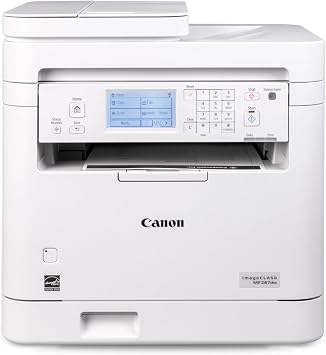
Canon imageCLASS MF287dw - Monochrome, Duplex, Wireless Laser Printer, All-in-One Print, Copy, Scan, Fax, Auto Document Feeder, 35 PPM, White
ผู้ซื้อ 85% แนะนำสินค้านี้ให้เพื่อน
 1 Sustainability Highlights
รายการ #:
92970934
THB 10678
รายละเอียดราคา
ไม่รวมค่าจัดส่งและค่าธรรมเนียมศุลกากร ( ค่าจัดส่งและค่าธรรมเนียมศุลกากรจะคำนวณตอนชำระเงิน )
*สินค้าทั้งหมดจะนำเข้าจาก สหรัฐอเมริกา
29%
0 ratings
เขียนรีวิว
50+ ซื้อแล้ว
มีสินค้า
 นำเข้าจาก USA ร้านค้า
จำนวน:
เหลือเพียง 6 รายการในสต็อก
สั่งซื้อตอนนี้และรับสินค้าประมาณ วันอังคาร, ตุลาคม 27
การทำธุรกรรมที่ปลอดภัย
Ubuy ทำงานอย่างหนักเพื่อปกป้องความปลอดภัยและความเป็นส่วนตัวของคุณ ระบบรักษาความปลอดภัยการชำระเงินขั้นสูงของเราช่วยให้ข้อมูลของคุณเป็นความลับ โดยการเข้ารหัสข้อมูลระหว่างการส่งโดยใช้โปรโตคอล AES (Advanced Encryption Standards) และ SSL (Secure Socket Layer) รายละเอียดการชำระเงินของคุณปลอดภัย 100% เนื่องจากเราไม่แบ่งปันข้อมูลการชำระเงินของคุณกับผู้ขายบุคคลที่สาม
พันธมิตรด้านโลจิสติกส์ชั้นนำของเรา


Print up to 35 pages-per-minute with a first print out of less than 4.9 seconds.

Fast
Shipping

คืนสินค้าฟรี*

แพ็คสินค้าอย่างปลอดภัย

สินค้าแท้ 100%

ผ่านมาตรฐาน PCI DSS

ได้รับการรับรอง ISO 27001












Note: Step Down Voltage Transformer required for using electronics products of สหรัฐอเมริกา store (110-120). Recommended power converters ซื้อเลย.


จุดเด่น
Versatile Functionality
This all-in-one printer combines printing, copying, scanning, and faxing, making it ideal for diverse office needs, enhancing workflow efficiency and reducing the need for multiple devices.
Fast Printing Speed
With a printing speed of up to 35 pages per minute, this printer significantly reduces wait times, allowing for quick document production, beneficial in high-demand work environments.
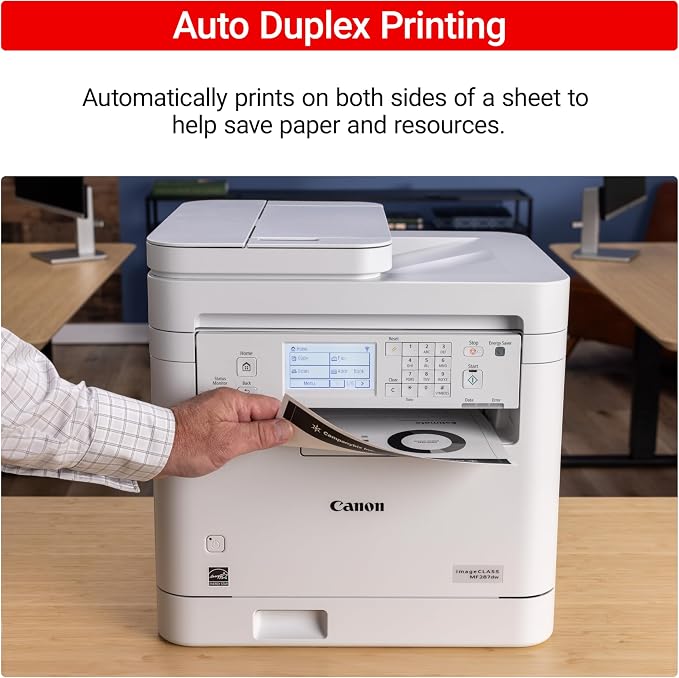
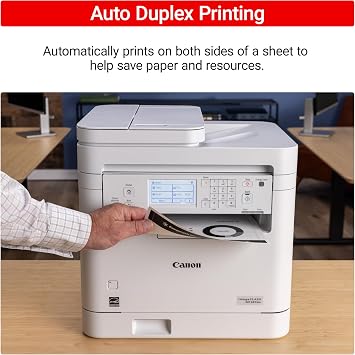
Duplex Printing
Automatic duplex printing saves both time and paper by printing on both sides, making it an eco-friendly choice while minimizing manual effort and enhancing productivity.
รายละเอียดสินค้า
| Printer Type | Laser |
| Other Special Features of the Product | Display Screen |
| Printer Output Type | Monochrome |
| Item Weight | 27.6 pounds (12.52 kg) |
| Item Dimensions D x W x H | 22.5"D x 22.8"W x 22.1"H (57.2 x 57.9 x 56.1 cm) |
| Print media | High-resolution paper, Paper (plain), Unknown |
| Scanner Type | Automatic Document Feeder |
| Maximum Copy Speed Black and White | 35 pages_per_minute |
| EU Spare Part Availability Duration | 1 years |
| Ink Color | Black |
| Additional Printer Functions | All In One |
| Compatible Cartridge | Canon Genuine Toner 072 Standard, 072 High Capacity |
| Number of Trays | 1 |
| Display Type | LCD |
| Resolution | 600 x 600 |
| Maximum Media Size | 8.5 x 14 inch |
| Maximum Sheet Capacity | 250 |
| Paper Size | 3 x 5 Inches to 8.5 x 14 Inches |
| Maximum Print Resolution Black and White | Up to 600 x 600 dpi |
| Wattage | 970 watts |
| Duplex | Automatic |
| Brand | Canon |
| Model Name | imageCLASS MF287dw |
| Model Number | 6354C011 |
| Built-In Media | Toner Cartridges |
| Series Number | 6354011 |
| Model Series | imageCLASS |
| Specific Uses For Product | Office |
| UPC | 013803372267 |
| Item Type Name | Laser Printer |
| Manufacturer | Canon |
| Color Pages per Minute | 35 |
| B&W Pages per Minute | 35 pages_per_minute |
| Color | White |
| Color Depth | 1 bits_per_pixel |
| Printer Connectivity Type | Wi-Fi |
| Hardware Interface | USB 2.0 |
| Total Usb Ports | 1 |
| Maximum Copy Resolution Black and White | Up to 600 x 600 dpi |
| Connectivity Technology | Wi-Fi |
| Printing Technology | Laser |
| Special Feature | Display Screen |
| Printer Output | Monochrome |
| Maximum Print Speed (Color) | 35 |
| Max Printspeed Monochrome | 35 pages_per_minute |
สิ่งที่อยู่ในกล่อง
Toner Cartridges
เหมาะสำหรับใคร?

-
Small Offices
Ideal for small offices needing efficient printing, copying, and scanning with high-quality monochrome output.
-
Home Offices
Perfect for home office users who require a reliable all-in-one printer for everyday document handling.
-
Frequent Print Users
Great for users printing large volumes due to fast print speeds and automatic duplex printing capabilities.

-
Photo Printing
Not suitable for users needing high-quality color photo prints, as it's a monochrome laser printer.
ข้อมูลผลิตภัณฑ์
Sustainability Highlights
This product has sustainability features recognized by trusted certifications.
Energy efficiency
Conserves energy compared to similar products. As certified by
Products that earn the U.S. Environmental Protection Agency’s ENERGY STAR label are independently certified to use less energy than standard models, reducing carbon pollution associated with energy generation and lowering your energy bill. For more information, visit energystar.gov. Learn more about this certification
มีข้อสงสัย? คุยกับเรา
คำถามและคำตอบของลูกค้า
-
คำถาม:
จะซื้อ Canon imageCLASS MF287dw - Monochrome, Duplex, ทางออนไลน์จาก Ubuy ได้อย่างไร
คำตอบ: ซื้อสินค้า Canon imageCLASS MF287dw - Monochrome, Duplex, ทางออนไลน์จาก Ubuy ได้ง่ายๆ. คุณเพียงแค่ต้องค้นหาสินค้า เลือกวิธีการจัดส่งของคุณในขณะที่ทำการชำระเงิน และส่งไปยังสถานที่ของคุณ -
คำถาม:
Canon imageCLASS MF287dw - Monochrome, Duplex, มีให้ช็อปออนไลน์ใน Thailand หรือไม่
คำตอบ: ใช่ ที่ Ubuy Thailand ผลิตภัณฑ์นี้มีให้คุณเลือกซื้อในราคาที่เหมาะสม. Canon imageCLASS MF287dw - Monochrome, Duplex, ไม่มีให้บริการในพื้นที่ แต่คุณสามารถไว้วางใจเราด้วยบริการจัดส่งด่วนของเรา -
คำถาม:
ใช้เวลานานแค่ไหนในการรับสินค้าหลังจากทำการสั่งซื้อ?
คำตอบ: เวลาจัดส่งของผลิตภัณฑ์ที่คุณสั่งซื้อจะแตกต่างกันไปตามสิ่งที่คุณสั่งซื้อและวิธีการจัดส่งที่คุณเลือก. เวลาจัดส่งโดยประมาณจะระบุไว้ในขั้นตอนการชำระเงิน ดังนั้นโปรดอย่ากังวลขณะช้อปปิ้ง
Canon Laser Printers 6354C011 Editorial Review


Canon imageCLASS MF287dw - Monochrome, Duplex, Wireless Laser Printer, All-in-One Print, Copy, Scan, Fax, Auto Document Feeder, 35 PPM, White delivers versatile functionality with features like automatic duplex printing and a high-speed capability of 35 pages per minute. Users appreciate the straightforward setup and wireless connectivity, which facilitates printing from anywhere in the home. However, some have noted inconsistencies in print quality, particularly when printing shipping labels; smudging and toner speckling have been mentioned as potential issues. The printer's comprehensive functions are handy for various office tasks, but those seeking higher print durability may need to consider alternatives.
ความคิดเห็นและคะแนนจากลูกค้า
162 การให้คะแนนของลูกค้า
-
5 ดาว
67%
-
4 ดาว
7%
-
3 ดาว
8%
-
2 ดาว
7%
-
1 ดาว
11%
แบ่งปันความคิดของคุณกับลูกค้าท่านอื่น
แชร์ความคิดของคุณกับลูกค้ารายอื่น
ข้อดี
- Wireless connectivity allows easy printing from anywhere
- Easy setup process for quick deployment
- All-in-one functionality covers printing, scanning, copying
- Compact dimensions fit well in most office spaces
- Automated duplex feature saves on paper usage
ข้อเสีย
- Could benefit from clearer documentation and instructions
ความน่าเชื่อถือของแพลตฟอร์ม

JK
Jasmin
ผู้ซื้อที่ยืนยันแล้ว
“Great products and very good service: very easy and very fast international delivery.”
9 September 2026 · ผ่าน Trustpilot
AG
Anke
ผู้ซื้อที่ยืนยันแล้ว
“Wonderful online shopping experience, smooth transaction from the start. Payment method works conveniently and delivery is unexpectedly fast and reliable. You go the extra mile for service. What makes this even more amazing, you deliver to Namibia. I will remain a happy Ubuy customer and will increase my purchases for sure! Thank you!”
10 September 2026 · ผ่าน Trustpilot
H
Hazel
ผู้ซื้อที่ยืนยันแล้ว
“Very easy to find the products what you need, and so fast delivery, that’s why I highly recommended to others costumers to used ubuy.”
10 September 2026 · ผ่าน Trustpilot
O
Opaleye
ผู้ซื้อที่ยืนยันแล้ว
“I received exactly what I ordered I was skeptical about your site because that was my first time to order. But the order came timely and neatly packaged. I was not disappointed. Thank you.”
11 September 2026 · ผ่าน Trustpilot
AC
Adele
ผู้ซื้อที่ยืนยันแล้ว
“Easy to find and order what you want on the website. Delivery is quick to the UK”
8 September 2026 · ผ่าน Trustpilot
ทำไมต้องช้อปกับเรา
การชำระเงินที่มั่นใจได้
จัดส่งทั่วโลก
การคืนสินค้าที่ง่ายดาย
สินค้าของแท้
Customers also viewed these products

ประวัติราคาสินค้า
ข้อมูลสำคัญ
- ข้อจำกัด: สำหรับสินค้าที่จัดส่งระหว่างประเทศ โปรดทราบว่าการรับประกันจากผู้ผลิตอาจไม่มีผลบังคับใช้ บริการหลังการขายจากผู้ผลิตอาจไม่สามารถใช้งานได้ คู่มือผลิตภัณฑ์ คำแนะนำการใช้งาน และคำเตือนด้านความปลอดภัยอาจไม่ได้จัดทำเป็นภาษาของประเทศปลายทาง สินค้า (รวมถึงเอกสารประกอบ) อาจไม่ได้ออกแบบให้สอดคล้องกับมาตรฐาน ข้อกำหนด และข้อบังคับด้านฉลากของประเทศปลายทาง และสินค้าอาจไม่สอดคล้องกับแรงดันไฟฟ้าและมาตรฐานทางไฟฟ้าอื่น ๆ ของประเทศปลายทาง (ซึ่งอาจต้องใช้ปลั๊กแปลงไฟหรือเครื่องแปลงแรงดันไฟฟ้าตามความเหมาะสม) ผู้รับสินค้ามีหน้าที่รับผิดชอบในการตรวจสอบว่าสินค้าดังกล่าวสามารถนำเข้าประเทศปลายทางได้อย่างถูกต้องตามกฎหมาย เมื่อสั่งซื้อสินค้าจาก Ubuy หรือบริษัทในเครือ ผู้รับสินค้าจะถือเป็นผู้นำเข้าตามกฎหมาย (Importer of Record) และต้องปฏิบัติตามกฎหมายและข้อบังคับทั้งหมดของประเทศปลายทาง
- ผลิตภัณฑ์บางรายการใน Ubuy ไม่ได้มีไว้เพื่อขาย เนื่องจาก Ubuy เป็นเครื่องมือค้นหาระดับโลก ผลิตภัณฑ์อยู่ภายใต้กฎระเบียบด้าน การส่งออก/การค้า
THB 10678
สั่งซื้อตอนนี้และรับสินค้าประมาณ วันอังคาร, ตุลาคม 27
สินค้านี้ไม่ถูกจำกัดในประเทศของฉัน (หากสินค้านี้ไม่ถูกจำกัดในประเทศของคุณ กรุณาคลิกลิงก์ด้านบน ทีมงานของเราจะตรวจสอบและเปิดให้สั่งซื้อ)
จำนวน:
เหลือเพียง 6 รายการในสต็อก
การทำธุรกรรมที่ปลอดภัย
ได้รับการรับรอง PCI DSS และ ISO 27001:2022 พร้อมการชำระเงินแบบเข้ารหัสและการคุ้มครองผู้ซื้อเต็มรูปแบบทุกคำสั่งซื้อ
พันธมิตรด้านโลจิสติกส์ชั้นนำของเรา
การจัดส่งข้ามพรมแดนที่เร็วที่สุด
คุณสมบัติและประโยชน์
- All in One wireless duplex laser printer.
- Print speeds of up to 35 pages-per-minute.
- First print out time in less than 4.9 seconds.
- Supports mobile printing through various apps.
- High capacity toner option reduces interruptions.
- Duplex printing saves paper and costs.
การรับประกันจาก Ubuy
ช้อปสบายใจไร้กังวล ด้วยสินค้าของแท้ 100% ระบบชำระเงินปลอดภัยได้มาตรฐาน PCI DSS การปกป้องข้อมูลด้วยมาตรฐาน ISO 27001 การจัดส่งข้ามพรมแดนที่รวดเร็วที่สุด คืนสินค้าฟรี และบรรจุภัณฑ์ที่ปลอดภัยในทุกคำสั่งซื้อ*