- หน้าแรก /
- วิดีโอเกม /
- ความจริงเสมือน (VR) /
- Standalone Hardware /
- อุปกรณ์เสริม /
- Official Left Hand Controller Touch Plus for ...
0 ratings


รายการ #:
132508784
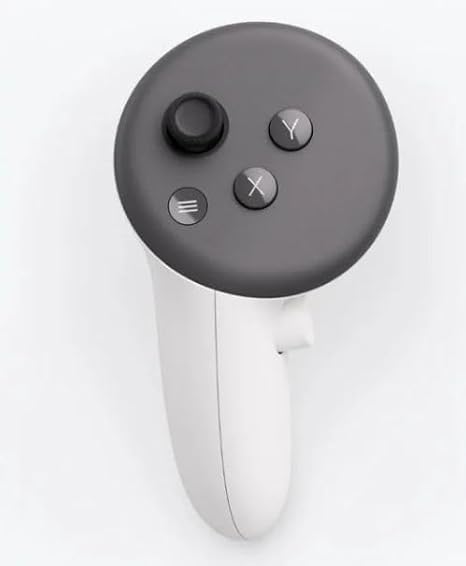
Official Left Hand Controller Touch Plus for Meta Quest 3 / 3s
รายการ #:
132508784
THB 5717
รายละเอียดราคา
ไม่รวมค่าจัดส่งและค่าธรรมเนียมศุลกากร ( ค่าจัดส่งและค่าธรรมเนียมศุลกากรจะคำนวณตอนชำระเงิน )
*สินค้าทั้งหมดจะนำเข้าจาก สหรัฐอเมริกา
0 ratings
เขียนรีวิว
100+ ซื้อแล้ว
มีสินค้า
 นำเข้าจาก USA ร้านค้า
จำนวน:
เหลือเพียง 11 รายการในสต็อก
สั่งซื้อตอนนี้และรับสินค้าประมาณ วันอังคาร, พฤศจิกายน 03
การทำธุรกรรมที่ปลอดภัย
Ubuy ทำงานอย่างหนักเพื่อปกป้องความปลอดภัยและความเป็นส่วนตัวของคุณ ระบบรักษาความปลอดภัยการชำระเงินขั้นสูงของเราช่วยให้ข้อมูลของคุณเป็นความลับ โดยการเข้ารหัสข้อมูลระหว่างการส่งโดยใช้โปรโตคอล AES (Advanced Encryption Standards) และ SSL (Secure Socket Layer) รายละเอียดการชำระเงินของคุณปลอดภัย 100% เนื่องจากเราไม่แบ่งปันข้อมูลการชำระเงินของคุณกับผู้ขายบุคคลที่สาม
พันธมิตรด้านโลจิสติกส์ชั้นนำของเรา


Innovative design: Each controller is designed with an ergonomic button layout and advanced haptics for more realistic feedback.

Fast
Shipping

คืนสินค้าฟรี*

แพ็คสินค้าอย่างปลอดภัย

สินค้าแท้ 100%

ผ่านมาตรฐาน PCI DSS

ได้รับการรับรอง ISO 27001












Note: Step Down Voltage Transformer required for using electronics products of สหรัฐอเมริกา store (110-120). Recommended power converters ซื้อเลย.


จุดเด่น
Enhanced Control
The Official Left Hand Controller offers precise motion tracking, allowing for seamless interaction in VR environments, enhancing gameplay while reducing motion sickness for users.
Ergonomic Design
Designed specifically for comfort, this controller features an ergonomic grip that ensures long gaming sessions can be enjoyed without discomfort, catering to avid gamers.
Compatibility Assurance
Engineered for perfect compatibility with Meta Quest 3 and 3s, providing users with a hassle-free setup and optimized performance specifically tailored to these systems.
รายละเอียดสินค้า
| Compatible Devices | Quest 3 |
| Controller Type | Joystick |
| Connectivity Technology | Bluetooth |
| Additional Features | Wireless |
| Button Quantity | 6 |
| Hardware Platform | Meta Quest 3/3s |
| Color | White |
| Brand Name | Generic |
| Model Name | RM |
| Manufacturer | Meta |
| Model Number | Touch Plus (Right) |
| Package Weight | 1 Pound |
เหมาะสำหรับใคร?

-
Left-Handed Gamers
This controller is specifically designed for left-handed players, providing a comfortable and intuitive gaming experience.
-
VR Enthusiasts
Ideal for users who frequently use the Meta Quest 3/3s for immersive VR experiences and need reliable controls.
-
Accessibility Needs
Beneficial for users with specific accessibility needs who require a left-hand compatible gaming controller.

-
Right-Handed Users
Right-handed gamers may struggle to adapt to using a left-hand controller and may prefer a standard controller.
ข้อมูลผลิตภัณฑ์
มีข้อสงสัย? คุยกับเรา
คำถามและคำตอบของลูกค้า
-
คำถาม:
จะซื้อ Official Left Hand Controller Touch Plus for Meta ทางออนไลน์จาก Ubuy ได้อย่างไร
คำตอบ: ซื้อสินค้า Official Left Hand Controller Touch Plus for Meta ทางออนไลน์จาก Ubuy ได้ง่ายๆ. คุณเพียงแค่ต้องค้นหาสินค้า เลือกวิธีการจัดส่งของคุณในขณะที่ทำการชำระเงิน และส่งไปยังสถานที่ของคุณ -
คำถาม:
Official Left Hand Controller Touch Plus for Meta มีให้ช็อปออนไลน์ใน Thailand หรือไม่
คำตอบ: ใช่ ที่ Ubuy Thailand ผลิตภัณฑ์นี้มีให้คุณเลือกซื้อในราคาที่เหมาะสม. Official Left Hand Controller Touch Plus for Meta ไม่มีให้บริการในพื้นที่ แต่คุณสามารถไว้วางใจเราด้วยบริการจัดส่งด่วนของเรา -
คำถาม:
ใช้เวลานานแค่ไหนในการรับสินค้าหลังจากทำการสั่งซื้อ?
คำตอบ: เวลาจัดส่งของผลิตภัณฑ์ที่คุณสั่งซื้อจะแตกต่างกันไปตามสิ่งที่คุณสั่งซื้อและวิธีการจัดส่งที่คุณเลือก. เวลาจัดส่งโดยประมาณจะระบุไว้ในขั้นตอนการชำระเงิน ดังนั้นโปรดอย่ากังวลขณะช้อปปิ้ง
Accessories Touch Plus (Right) Editorial Review
The Official Left Hand Controller Touch Plus for Meta Quest 3 / 3s is designed specifically for the Quest 3, offering an immersive gaming experience with its wireless joystick functionality. This controller features six buttons, ensuring you have all the necessary controls at your fingertips while enjoying enhanced gameplay. The sleek white design complements the Meta Quest 3 beautifully. Additionally, the controller is battery powered, allowing for flexible and convenient usage without being tied down by cords. Gamers have praised the responsive buttons and comfortable grip, making it an essential addition to your gaming setup.
ความคิดเห็นและคะแนนจากลูกค้า
38 การให้คะแนนของลูกค้า
-
5 ดาว
79%
-
4 ดาว
13%
-
3 ดาว
3%
-
2 ดาว
0%
-
1 ดาว
5%
แบ่งปันความคิดของคุณกับลูกค้าท่านอื่น
แชร์ความคิดของคุณกับลูกค้ารายอื่น
ข้อดี
- Designed for optimal compatibility with Quest 3
- Wireless functionality for hassle-free gameplay
- Features six responsive buttons
- Compact and lightweight design
- Sleek white aesthetic for modern look
ข้อเสีย
- Battery-powered may require frequent replacement or charging
ความน่าเชื่อถือของแพลตฟอร์ม

JK
Jasmin
ผู้ซื้อที่ยืนยันแล้ว
“Great products and very good service: very easy and very fast international delivery.”
9 September 2026 · ผ่าน Trustpilot
AG
Anke
ผู้ซื้อที่ยืนยันแล้ว
“Wonderful online shopping experience, smooth transaction from the start. Payment method works conveniently and delivery is unexpectedly fast and reliable. You go the extra mile for service. What makes this even more amazing, you deliver to Namibia. I will remain a happy Ubuy customer and will increase my purchases for sure! Thank you!”
10 September 2026 · ผ่าน Trustpilot
H
Hazel
ผู้ซื้อที่ยืนยันแล้ว
“Very easy to find the products what you need, and so fast delivery, that’s why I highly recommended to others costumers to used ubuy.”
10 September 2026 · ผ่าน Trustpilot
O
Opaleye
ผู้ซื้อที่ยืนยันแล้ว
“I received exactly what I ordered I was skeptical about your site because that was my first time to order. But the order came timely and neatly packaged. I was not disappointed. Thank you.”
11 September 2026 · ผ่าน Trustpilot
AC
Adele
ผู้ซื้อที่ยืนยันแล้ว
“Easy to find and order what you want on the website. Delivery is quick to the UK”
8 September 2026 · ผ่าน Trustpilot
ทำไมต้องช้อปกับเรา
การชำระเงินที่มั่นใจได้
จัดส่งทั่วโลก
การคืนสินค้าที่ง่ายดาย
สินค้าของแท้
Customers also viewed these products
ประวัติราคาสินค้า
ข้อมูลสำคัญ
- ข้อจำกัด: สำหรับสินค้าที่จัดส่งระหว่างประเทศ โปรดทราบว่าการรับประกันจากผู้ผลิตอาจไม่มีผลบังคับใช้ บริการหลังการขายจากผู้ผลิตอาจไม่สามารถใช้งานได้ คู่มือผลิตภัณฑ์ คำแนะนำการใช้งาน และคำเตือนด้านความปลอดภัยอาจไม่ได้จัดทำเป็นภาษาของประเทศปลายทาง สินค้า (รวมถึงเอกสารประกอบ) อาจไม่ได้ออกแบบให้สอดคล้องกับมาตรฐาน ข้อกำหนด และข้อบังคับด้านฉลากของประเทศปลายทาง และสินค้าอาจไม่สอดคล้องกับแรงดันไฟฟ้าและมาตรฐานทางไฟฟ้าอื่น ๆ ของประเทศปลายทาง (ซึ่งอาจต้องใช้ปลั๊กแปลงไฟหรือเครื่องแปลงแรงดันไฟฟ้าตามความเหมาะสม) ผู้รับสินค้ามีหน้าที่รับผิดชอบในการตรวจสอบว่าสินค้าดังกล่าวสามารถนำเข้าประเทศปลายทางได้อย่างถูกต้องตามกฎหมาย เมื่อสั่งซื้อสินค้าจาก Ubuy หรือบริษัทในเครือ ผู้รับสินค้าจะถือเป็นผู้นำเข้าตามกฎหมาย (Importer of Record) และต้องปฏิบัติตามกฎหมายและข้อบังคับทั้งหมดของประเทศปลายทาง
- ผลิตภัณฑ์บางรายการใน Ubuy ไม่ได้มีไว้เพื่อขาย เนื่องจาก Ubuy เป็นเครื่องมือค้นหาระดับโลก ผลิตภัณฑ์อยู่ภายใต้กฎระเบียบด้าน การส่งออก/การค้า
THB 5717
สั่งซื้อตอนนี้และรับสินค้าประมาณ วันอังคาร, พฤศจิกายน 03
สินค้านี้ไม่ถูกจำกัดในประเทศของฉัน (หากสินค้านี้ไม่ถูกจำกัดในประเทศของคุณ กรุณาคลิกลิงก์ด้านบน ทีมงานของเราจะตรวจสอบและเปิดให้สั่งซื้อ)
จำนวน:
เหลือเพียง 11 รายการในสต็อก
การทำธุรกรรมที่ปลอดภัย
ได้รับการรับรอง PCI DSS และ ISO 27001:2022 พร้อมการชำระเงินแบบเข้ารหัสและการคุ้มครองผู้ซื้อเต็มรูปแบบทุกคำสั่งซื้อ
พันธมิตรด้านโลจิสติกส์ชั้นนำของเรา
การจัดส่งข้ามพรมแดนที่เร็วที่สุด
คุณสมบัติและประโยชน์
- Replace your lost left Touch Plus controller easily.
- Compatible with both Quest 3 and Quest 3S.
- Ergonomic button layout enhances comfort during use.
- Advanced haptics provide realistic feedback.
- Includes a wrist strap for secure handling.
- Transports you into immersive mixed reality experiences.
การรับประกันจาก Ubuy
ช้อปสบายใจไร้กังวล ด้วยสินค้าของแท้ 100% ระบบชำระเงินปลอดภัยได้มาตรฐาน PCI DSS การปกป้องข้อมูลด้วยมาตรฐาน ISO 27001 การจัดส่งข้ามพรมแดนที่รวดเร็วที่สุด คืนสินค้าฟรี และบรรจุภัณฑ์ที่ปลอดภัยในทุกคำสั่งซื้อ*