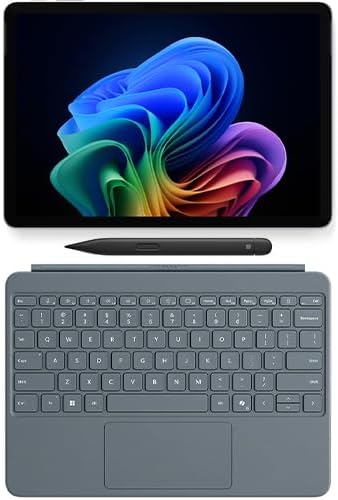

Microsoft Surface Pro Copilot PC Platinum  Surface Slim Pen 2
The power to go beyond what you thought possible is yours with the Surface Pro 12.
Microsoft Surface Pro Copilot PC Platinum  Surface Slim Pen 2
รายการ #: 147365879

Microsoft Surface Pro Copilot PC Platinum Surface Slim Pen 2

รายการ #: 147365879

THB 62182

Price Details

Excluding Shipping & Custom charges ( Shipping and custom charges will be calculated on checkout )

*All items will import from สหรัฐอเมริกา

มีสินค้า
สหรัฐอเมริกา นำเข้าจาก USA ร้านค้า
สั่งซื้อตอนนี้และรับสินค้าประมาณ วันเสาร์, กรกฎาคม 04
พันธมิตรด้านโลจิสติกส์ชั้นนำของเรา
  • fedex
  • dhl
The power to go beyond what you thought possible is yours with the Surface Pro 12.
การรับประกัน U-Care:
ไม่มี
เลือกแผน
fast shipping

Fast
Shipping

free return

คืนสินค้าฟรี*

แพ็คสินค้าอย่างปลอดภัย

แพ็คสินค้าอย่างปลอดภัย

สินค้าแท้ 100%

สินค้าแท้ 100%

pci-dss

PCI DSS Compliance

iso certified

ISO 27001 Certified


paypal payment
visa payment
mastercard payment
american express payment
bank transfer thailand payment
k plus payment
cenpay payment
boonterm kiosk payment
thai qr payment
big c payment
true money wallet payment
rabbit line pay payment
Note: Step Down Voltage Transformer required for using electronics products of สหรัฐอเมริกา store (110-120). Recommended power converters ซื้อเลย.

จุดเด่น

Versatile Performance
The Surface Pro Copilot+ delivers powerful computing performance, seamlessly transitioning from tablet to laptop mode, perfect for both personal and professional use.
Enhanced Creativity
With the Surface Slim Pen 2, users enjoy precision and comfort in sketching and note-taking, elevating creative projects and productivity.
Sleek Design
The Platinum finish offers a premium aesthetic that combines elegance with portability, making it an ideal choice for style-conscious professionals on the go.

รายละเอียดสินค้า

Shop Microsoft Surface Pro Copilot PC Platinum Surface Slim Pen 2 online at a best price in ประเทศไทย. B0FDJNGTK7
Item Weight3.5 lbs (1.59 kg)

เหมาะสำหรับใคร?

Suitable For
  • Students and Educators

    Ideal for taking notes, creating presentations, and running educational software seamlessly on a portable device.

  • Creative Professionals

    Perfect for artists and designers who require precision in drawing and sketching using the Surface Slim Pen 2.

  • Business Users

    Great for professionals needing a versatile device for meetings, document management, and remote work tasks.

Not Suitable For
  • Heavy Gamers

    May struggle with high-performance gaming due to limited graphics capabilities compared to dedicated gaming laptops.

  • Budget-Conscious Users

    Higher price point might deter users looking for more economical computing solutions without advanced features.

  • Power Users

    May not meet intensive computing demands for tasks like video editing or 3D rendering effectively.

ข้อมูลผลิตภัณฑ์

Microsoft Surface Pro Copilot PC Platinum Surface Slim Pen 2

มีข้อสงสัย? คุยกับเรา

คําถามและคําตอบของลูกค้า

  • คำถาม: What are the main features of the Microsoft Surface Pro Copilot+ PC?

    คำตอบ: The Microsoft Surface Pro Copilot+ PC boasts a powerful Intel processor, a stunning high-resolution touchscreen, and versatile connectivity options. This device is designed for both professional and creative users, providing exceptional performance for demanding applications and multitasking. The sleek design makes it portable, allowing you to transition from work to play effortlessly. Ideal for students and professionals, it's perfect for taking notes, editing documents, or creating presentations while on the go.
  • คำถาม: Can I use the Surface Slim Pen 2 with other devices?

    คำตอบ: The Surface Slim Pen 2 is specifically designed for the Surface devices, particularly the Surface Pro Copilot+ PC, to provide optimal performance and functionality. However, it may have limited compatibility with other touchscreen devices that support styluses. The pen offers advanced features, such as haptic feedback and precision tip, enhancing your drawing and writing experience. If you’re an artist, designer, or note-taker, it helps bring your ideas to life seamlessly on the Surface.
  • คำถาม: How does the Surface Pro Copilot+ PC compare to other laptops?

    คำตอบ: The Surface Pro Copilot+ PC stands out with its hybrid design, offering the functionality of a laptop and the portability of a tablet. It provides superior versatility with detachable keyboard support, allowing you to flip between laptop and tablet modes. The high-resolution display delivers vibrant visuals, making it an excellent choice for media consumption or creative tasks. Whether you're working from a café or collaborating in a conference room, its lightweight design and long battery life ensure productivity on the go.
  • คำถาม: Is the Surface Pro Copilot+ suitable for gaming?

    คำตอบ: While the Surface Pro Copilot+ PC is primarily designed for productivity and creative tasks, it can handle casual gaming quite well. Its powerful hardware supports a range of mainstream games without significant lag. However, hardcore gamers may find it lacking for the latest high-demand titles. For light gaming or indie games, it provides a responsive touch interface and a smooth experience. Whether you want to enjoy a quick gaming session during breaks or unwind after work, it's a versatile device.
  • คำถาม: What software and applications are optimized for the Surface Pro Copilot+?

    คำตอบ: The Surface Pro Copilot+ PC is optimized for Microsoft applications, including the Office suite, creative software like Adobe Photoshop and Illustrator, and productivity tools such as OneNote. These applications benefit from the device’s touchscreen and Surface Slim Pen 2 capabilities, enhancing the user experience. Whether you're drafting documents, designing graphics, or brainstorming ideas, the seamless integration allows for efficient workflows and improved productivity. It's perfect for professionals and creatives alike.
  • คำถาม: How long does the battery last on the Surface Pro Copilot+ PC?

    คำตอบ: The Surface Pro Copilot+ PC features impressive battery life that can last for several hours of intensive use. On average, users can expect up to 15 hours of usage on a full charge depending on application usage and settings. This makes it ideal for long meetings, classes, or travel where access to power sources may be limited. Whether you’re taking notes during lectures or collaborating in meetings, its extended battery life keeps you connected and productive throughout the day.
  • คำถาม: What connectivity options does the Surface Pro Copilot+ provide?

    คำตอบ: The Surface Pro Copilot+ PC offers a comprehensive range of connectivity options. It includes USB-C ports, a Surface Connect port, and a headphone jack, providing flexibility for peripherals. Dual-band Wi-Fi ensures fast and reliable internet connectivity while Bluetooth supports wireless accessories. This variety makes it adaptable for different work environments and enhances productivity. Whether you’re connecting a monitor for presentations or syncing with other devices, it supports diverse setups for your needs.
  • คำถาม: How does the Copilot+ feature enhance productivity?

    คำตอบ: The Copilot+ feature leverages AI technology to assist with tasks, from organizing files to scheduling meetings. It responds to voice commands, enabling hands-free operation, making it easier to manage workloads efficiently. This integration allows you to focus more on your tasks while the AI suggests shortcuts or automates repetitive actions. Ideal for busy professionals, this feature maximizes productivity, ensuring you can accomplish more in less time.
  • คำถาม: Can the Surface Slim Pen 2 be charged wirelessly?

    คำตอบ: Yes, the Surface Slim Pen 2 can be charged wirelessly when attached to the Surface Pro Copilot+ PC or in the corresponding charging area of the Surface keyboard. This feature eliminates the need for cumbersome cables, making it convenient to keep your pen ready for use. For users who frequently take notes or sketch, the ability to charge while the device is in use ensures that the pen is always charged and ready for immediate access.
  • คำถาม: Where can I buy the Microsoft Surface Pro Copilot+ PC Platinum + Surface Slim Pen 2 in Thailand?

    คำตอบ: You can buy the Microsoft Surface Pro Copilot+ PC Platinum + Surface Slim Pen 2 from Ubuy in Thailand. Ubuy is a reliable platform that offers a wide range of electronics and ensures a smooth shopping experience. Browse their extensive collection to find your perfect Surface Pro setup.

Microsoft 2 in 1 Laptops Editorial Review

ไม่พบบทวิจารณ์ด้านบรรณาธิการ

ความคิดเห็นและคะแนนจากลูกค้า

5.0
1 การให้คะแนนของลูกค้า
  • 5 ดาว
    100%
  • 4 ดาว
    0%
  • 3 ดาว
    0%
  • 2 ดาว
    0%
  • 1 ดาว
    0%

แบ่งปันความคิดของคุณกับลูกค้าท่านอื่น

แชร์ความคิดของคุณกับลูกค้ารายอื่น

ประวัติราคาสินค้า

ข้อมูลสำคัญ

  • ข้อจำกัด : สำหรับผลิตภัณฑ์ที่จัดส่งระหว่างประเทศ โปรดทราบว่าการรับประกันของผู้ผลิตอาจไม่ถูกต้อง ตัวเลือกบริการของผู้ผลิตอาจไม่สามารถใช้ได้ คู่มือผลิตภัณฑ์ คำแนะนำ และคำเตือนด้านความปลอดภัยอาจไม่เป็นภาษาของประเทศปลายทาง ผลิตภัณฑ์ (และวัสดุประกอบ) อาจไม่ได้รับการออกแบบตามมาตรฐาน คุณลักษณะเฉพาะ และข้อกำหนดเกี่ยวกับการติดฉลากของประเทศปลายทาง และผลิตภัณฑ์อาจใช้แรงดันไฟฟ้าไม่สอดคล้องกับของประเทศปลายทางและมาตรฐานทางไฟฟ้าอื่น ๆ (ต้องใช้อะแดปเตอร์หรือตัวแปลงไฟตามความเหมาะสม) ผู้รับมีหน้าที่ตรวจสอบให้แน่ใจว่าสินค้าสามารถนำเข้าประเทศปลายทางได้อย่างถูกกฎหมาย เมื่อสั่งซื้อจาก Ubuy หรือตัวแทนจำหน่าย ผู้รับคือผู้นำตามกฎหมาย และต้องปฏิบัติตามกฎหมายและระเบียบข้อบังคับทั้งหมดของประเทศปลายทาง
  • ผลิตภัณฑ์บางรายการใน Ubuy ไม่ได้มีไว้เพื่อขาย เนื่องจาก Ubuy เป็นเครื่องมือค้นหาระดับโลก ผลิตภัณฑ์อยู่ภายใต้กฎระเบียบด้าน การส่งออก/การค้า