- หน้าแรก /
- วิดีโอเกม /
- PC /
- อุปกรณ์เสริม /
- Controllers /
- Gamepads & Standard Controllers /
- Steam Controller
0 ratings


การทำธุรกรรมที่ปลอดภัย
Ubuy ทำงานอย่างหนักเพื่อปกป้องความปลอดภัยและความเป็นส่วนตัวของคุณ ระบบรักษาความปลอดภัยการชำระเงินขั้นสูงของเราช่วยให้ข้อมูลของคุณเป็นความลับ โดยการเข้ารหัสข้อมูลระหว่างการส่งโดยใช้โปรโตคอล AES (Advanced Encryption Standards) และ SSL (Secure Socket Layer) รายละเอียดการชำระเงินของคุณปลอดภัย 100% เนื่องจากเราไม่แบ่งปันข้อมูลการชำระเงินของคุณกับผู้ขายบุคคลที่สาม
พันธมิตรด้านโลจิสติกส์ชั้นนำของเรา


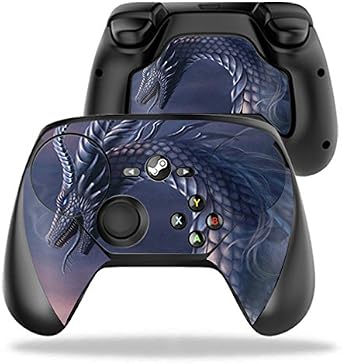
The Steam Controller frees you from your keyboard and mouse and lets you play your favorite Steam games on your TV.

Fast
Shipping

คืนสินค้าฟรี*

แพ็คสินค้าอย่างปลอดภัย

สินค้าแท้ 100%

PCI DSS Compliance

ISO 27001 Certified


Note: Step Down Voltage Transformer required for using electronics products of สหรัฐอเมริกา store (110-120). Recommended power converters ซื้อเลย.


สินค้าที่คล้ายกัน














จุดเด่น
Customizable Controls
The Steam Controller offers extensive customization options, allowing users to tailor button layouts and sensitivity settings for an optimized gaming experience tailored to individual preferences.
Dual Trackpads
Equipped with dual trackpads, the Steam Controller enhances precision and accuracy for both casual and competitive gaming, offering mouse-like control without sacrificing the comfort of a traditional gamepad.
Wide Compatibility
Designed for seamless integration with Steam's Big Picture mode, the Steam Controller supports a vast library of PC games, making it a versatile choice for gamers looking for a comprehensive gaming solution.
รายละเอียดสินค้า
- Precision control for Steam games on TV without controller support
- Features dual trackpads, HD haptic feedback, dual-stage triggers, and back grip buttons
- Fully customizable control schemes and configurations available in Steam Controller community
- Dual trackpads allow 1:1 absolute position input via virtual controls
- Dual-stage triggers enable analog, digital, or simultaneous input
- Ergonomically positioned input zones and buttons for comfort and precision
| Item Weight | 1 lbs (450 grams) |
เหมาะสำหรับใคร?

-
PC Gamers
Ideal for PC gamers who prefer a gamepad control scheme combined with keyboard and mouse precision in gameplay.
-
Steam Big Picture
Perfect for users who access Steam's Big Picture Mode, enhancing the living room gaming experience with console-style controls.
-
Customizable Gameplay
Beneficial for gamers who value custom controls and want to tailor the layout for specific games and preferences.

-
Casual Gamers
Not suitable for casual gamers who prefer simple and straightforward gamepad options without complex configurations.
-
Console Players
May not appeal to dedicated console players used to traditional controllers, seeking familiar ergonomics and layouts.
-
Mobile Gaming
Inappropriate for mobile gamers who need lightweight, portable controllers that easily connect to smartphones or tablets.
ข้อมูลผลิตภัณฑ์
Steam Controller
มีข้อสงสัย? คุยกับเรา
การค้นหาที่เกี่ยวข้อง
คําถามและคําตอบของลูกค้า
-
คำถาม:
What makes the Steam Controller unique compared to other gaming controllers?
คำตอบ: The Steam Controller stands out because of its customizable features and its ability to seamlessly integrate with a wide range of games on the Steam platform. It features dual trackpads, allowing for precise control and an innovative layout that can cater to both casual and hardcore gamers. This adaptability means players can enjoy a mouse-like experience in games that traditionally benefit from precision, enhancing gameplay in genres like FPS and strategy games. -
คำถาม:
Can I use the Steam Controller with my PC and other devices?
คำตอบ: Yes, the Steam Controller is primarily designed for use with PCs and is compatible with a variety of operating systems, including Windows, macOS, and Linux. Beyond PC, it can also be used with other devices that support Bluetooth, allowing gamers to enjoy their favorite titles on different platforms. This versatility makes it a great choice for those who play across multiple formats or want to use a single controller for various devices. -
คำถาม:
How does the customization feature of the Steam Controller work?
คำตอบ: The Steam Controller offers extensive customization options through the Steam Big Picture Mode. Users can remap buttons, adjust sensitivity settings, and even create profiles for different games. This means you can tailor the controller to fit your personal playstyle, whether you prefer faster reflexes in competitive games or more deliberate controls in story-driven titles. Scenarios like switching between genres can greatly benefit from these personalized settings. -
คำถาม:
What types of games are best suited for the Steam Controller?
คำตอบ: The Steam Controller excels in games that require precision and versatile input methods, including first-person shooters, strategy games, and indie titles with unique control schemes. By utilizing its trackpads and customizable layouts, players can experience greater depth and control in their gameplay. For example, strategy gamers may find it particularly helpful to emulate mouse controls while sitting on the couch, blending comfort with competitiveness. -
คำถาม:
Can the Steam Controller connect wirelessly?
คำตอบ: Yes, the Steam Controller supports wireless connectivity via Bluetooth, allowing for a clutter-free gaming experience. This feature ensures you can relax and play comfortably from a distance without worrying about wires. It's perfect for those who enjoy gaming on their couch or want to set up a gaming station without the tangle of cords, making it highly convenient for social gaming sessions with friends. -
คำถาม:
Is the Steam Controller suitable for someone new to gaming?
คำตอบ: Absolutely! The Steam Controller is designed with the flexibility to cater to both newcomers and experienced gamers. Its customizable settings enable new players to make adjustments that enhance their comfort and familiarity with controls over time. For new gamers, this means they can start with simpler button layouts and gradually explore more complex settings as they gain confidence and skills. -
คำถาม:
What are the advantages of using trackpads over traditional sticks?
คำตอบ: Trackpads, like those on the Steam Controller, provide pixel-perfect precision and additional functionality compared to traditional analog sticks. They allow for smoother movements in high-speed games and can be used for gestures that would be cumbersome with sticks alone. This feature is particularly useful in genres that require fine-tuned control, such as simulation or FPS games, where precision often determines victory. -
คำถาม:
Does the Steam Controller require software to work?
คำตอบ: While the Steam Controller is plug-and-play with basic functionality, it achieves its full potential through the Steam Client on PC where you can customize controls, settings, and game profiles. This software is crucial for gamers who want to maximize the functionality of their controller and make it truly their own, particularly when switching between different genres or specific game titles. -
คำถาม:
How can I maintain my Steam Controller?
คำตอบ: To maintain your Steam Controller, regularly check for software updates through Steam to ensure optimal performance. Additionally, cleaning it with a dry microfiber cloth can help keep the exterior free of dirt and grime, while ensuring the trackpads and buttons function smoothly. Proper care can prolong its lifespan, allowing you to enjoy consistent performance during gaming sessions. -
คำถาม:
Where can I buy the Steam Controller in Thailand?
คำตอบ: You can purchase the Steam Controller in Thailand from Ubuy. They offer a reliable platform with various options to explore the product. Ubuy is known for its excellent customer service and support, making it a great choice for anyone looking to enhance their gaming experience.
valve-index Gamepads & Standard Controllers Editorial Review
The Steam Controller is a versatile game controller that is compatible with Windows, Mac, and Linux. It can be used with any game in desktop mode with Steam running in the background. The controller comes with a wireless adapter and can also be connected to a PC through Bluetooth. However, it does not have access to recommended or community configurations for non-Steam games. The controller has received mixed reviews, with some praising its durability and customization options, while others find it difficult to configure and uncomfortable to use. It is worth noting that the controller has been discontinued and can now be found at a higher price than its original MSRP of $50.
ความคิดเห็นและคะแนนจากลูกค้า
1 การให้คะแนนของลูกค้า
-
5 ดาว
100%
-
4 ดาว
0%
-
3 ดาว
0%
-
2 ดาว
0%
-
1 ดาว
0%
แบ่งปันความคิดของคุณกับลูกค้าท่านอื่น
แชร์ความคิดของคุณกับลูกค้ารายอื่น
ข้อดี
- Compatible with Windows, Mac, and Linux
- Customizable configurations
- Durable
ข้อเสีย
- Difficult to configure
Related Categories
Related Brands
Top selling Steam Controller in Thailand



Last Updated on June 28, 2026
ประวัติราคาสินค้า
ข้อมูลสำคัญ
- ข้อจำกัด : สำหรับผลิตภัณฑ์ที่จัดส่งระหว่างประเทศ โปรดทราบว่าการรับประกันของผู้ผลิตอาจไม่ถูกต้อง ตัวเลือกบริการของผู้ผลิตอาจไม่สามารถใช้ได้ คู่มือผลิตภัณฑ์ คำแนะนำ และคำเตือนด้านความปลอดภัยอาจไม่เป็นภาษาของประเทศปลายทาง ผลิตภัณฑ์ (และวัสดุประกอบ) อาจไม่ได้รับการออกแบบตามมาตรฐาน คุณลักษณะเฉพาะ และข้อกำหนดเกี่ยวกับการติดฉลากของประเทศปลายทาง และผลิตภัณฑ์อาจใช้แรงดันไฟฟ้าไม่สอดคล้องกับของประเทศปลายทางและมาตรฐานทางไฟฟ้าอื่น ๆ (ต้องใช้อะแดปเตอร์หรือตัวแปลงไฟตามความเหมาะสม) ผู้รับมีหน้าที่ตรวจสอบให้แน่ใจว่าสินค้าสามารถนำเข้าประเทศปลายทางได้อย่างถูกกฎหมาย เมื่อสั่งซื้อจาก Ubuy หรือตัวแทนจำหน่าย ผู้รับคือผู้นำตามกฎหมาย และต้องปฏิบัติตามกฎหมายและระเบียบข้อบังคับทั้งหมดของประเทศปลายทาง
- ผลิตภัณฑ์บางรายการใน Ubuy ไม่ได้มีไว้เพื่อขาย เนื่องจาก Ubuy เป็นเครื่องมือค้นหาระดับโลก ผลิตภัณฑ์อยู่ภายใต้กฎระเบียบด้าน การส่งออก/การค้า
Currently unavailable.
We don't know when or if this item will be back in stock.
This item is not restrict in my country.(Please click on above link if this item is not restrict in your country, So our team will review and allow.)
การทำธุรกรรมที่ปลอดภัย
Ubuy ทำงานอย่างหนักเพื่อปกป้องความปลอดภัยและความเป็นส่วนตัวของคุณ ระบบรักษาความปลอดภัยการชำระเงินขั้นสูงของเราช่วยให้ข้อมูลของคุณเป็นความลับ โดยการเข้ารหัสข้อมูลระหว่างการส่งโดยใช้โปรโตคอล AES (Advanced Encryption Standards) และ SSL (Secure Socket Layer) รายละเอียดการชำระเงินของคุณปลอดภัย 100% เนื่องจากเราไม่แบ่งปันข้อมูลการชำระเงินของคุณกับผู้ขายบุคคลที่สาม
พันธมิตรด้านโลจิสติกส์ชั้นนำของเรา
การจัดส่งข้ามประเทศที่รวดเร็วที่สุด
คุณสมบัติและประโยชน์
- Play your favorite Steam games on your TV
- Find or create your own configurations
- Dual trackpads for precise control
- Input zones and buttons optimized for comfort
- Compatible with Windows, Linux, Mac, and SteamOS