- หน้าแรก /
- หนังสือ /
- Computing & Internet /
- Software & Graphics /
- Graphics & Multimedia /
- 3-D Graphics /
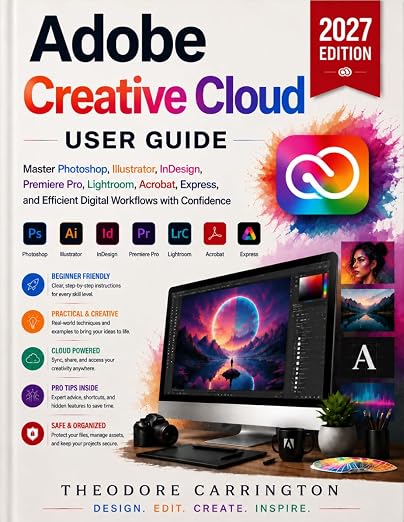
- Adobe Creative Cloud User Guide: Master Photo...
0 ratings




รายการ #:
258015667
Adobe Creative Cloud User Guide: Master Photoshop, Illustrator, InDesign, Premiere Pro, Lightroom, Acrobat, Express, and Efficient Digital Workflows
รายการ #:
258015667
THB 1009
รายละเอียดราคา
ไม่รวมค่าจัดส่งและค่าธรรมเนียมศุลกากร ( ค่าจัดส่งและค่าธรรมเนียมศุลกากรจะคำนวณตอนชำระเงิน )
*สินค้าทั้งหมดจะนำเข้าจาก สหราชอาณาจักร
0 ratings
เขียนรีวิว
มีสินค้า
 นำเข้าจาก UK ร้านค้า
จำนวน:
สั่งซื้อตอนนี้และรับสินค้าประมาณ วันศุกร์, ตุลาคม 09
การทำธุรกรรมที่ปลอดภัย
Ubuy ทำงานอย่างหนักเพื่อปกป้องความปลอดภัยและความเป็นส่วนตัวของคุณ ระบบรักษาความปลอดภัยการชำระเงินขั้นสูงของเราช่วยให้ข้อมูลของคุณเป็นความลับ โดยการเข้ารหัสข้อมูลระหว่างการส่งโดยใช้โปรโตคอล AES (Advanced Encryption Standards) และ SSL (Secure Socket Layer) รายละเอียดการชำระเงินของคุณปลอดภัย 100% เนื่องจากเราไม่แบ่งปันข้อมูลการชำระเงินของคุณกับผู้ขายบุคคลที่สาม
พันธมิตรด้านโลจิสติกส์ชั้นนำของเรา


Fast
Shipping

คืนสินค้าฟรี*

แพ็คสินค้าอย่างปลอดภัย

สินค้าแท้ 100%

ผ่านมาตรฐาน PCI DSS

ได้รับการรับรอง ISO 27001












รายละเอียดสินค้า
- What if one practical guide was all you needed to finally master Adobe Creative Cloud, including Photoshop, Illustrator, InDesign, Premiere Pro, and more, without the overwhelm, confusion, or wasted hours?If you have spent hours watching tutorials, clicking through menus, and still cannot make your Adobe applications produce what you envision, the problem is not you. You simply have not been given a clear, structured system.Most Creative Cloud users are told to explore and figure things out as they go. What you really need is a guide that explains the right tool, in the right order, for the right creative task.Adobe Creative Cloud User Guide provides a complete, beginner-friendly roadmap across eight essential Adobe applications and tools. No confusing jargon. No scattered theory. Just clear, step-by-step instructions supported by practical creative projects from the very first chapter.Inside this comprehensive guide, you will learn how to:Edit, enhance, and retouch photographs in Photoshop, even if you have never used it beforeCreate logos, icons, illustrations, and brand graphics in IllustratorDesign books, brochures, magazines, and professional multi-page layouts in InDesignEdit footage, add captions, color-grade projects, and export professional videos in Premiere ProOrganize, enhance, and manage your entire photo library in LightroomCreate, edit, sign, organize, and protect PDF documents using Acrobat ProProduce polished social media graphics with Adobe Express and Firefly AIKeep your files organized, backed up, and accessible across projects and devicesUnlike generic software manuals, this guide combines real-world projects, practical workflows, and professional export settings from the beginning. Every chapter also includes a Quick Reference Sheet, helping you review essential tools, commands, and processes whenever you need them.Explore important 2026 and beyond features and workflows, including Firefly AI, Generative Fill, automatic captions, and updated Creative Cloud productivity tools.Whether you are a complete beginner, aspiring designer, content creator, photographer, video editor, student, or small-business owner, this guide will help you turn your creative ideas into polished results.Stop guessing and start creating with confidence. Scroll up and click Buy Now to begin mastering Adobe Creative Cloud today.
| Publisher | Independently published |
| Publication date | 4 Sept. 2026 |
| Language | English |
| Print length | 174 pages |
| ISBN-13 | 979-8171866785 |
| Item weight | 422 g |
| Dimensions | 21.59 x 1.02 x 27.94 cm |
ข้อมูลผลิตภัณฑ์
Adobe Creative Cloud User Guide: Master Photoshop, Illustrator, InDesign, Premiere Pro, Lightroom, Acrobat, Express, and Efficient Digital Workflows with Confidence
มีข้อสงสัย? คุยกับเรา
คำถามและคำตอบของลูกค้า
-
คำถาม:
จะซื้อ Adobe Creative Cloud User Guide: Master Photoshop, ทางออนไลน์จาก Ubuy ได้อย่างไร
คำตอบ: ซื้อสินค้า Adobe Creative Cloud User Guide: Master Photoshop, ทางออนไลน์จาก Ubuy ได้ง่ายๆ. คุณเพียงแค่ต้องค้นหาสินค้า เลือกวิธีการจัดส่งของคุณในขณะที่ทำการชำระเงิน และส่งไปยังสถานที่ของคุณ -
คำถาม:
Adobe Creative Cloud User Guide: Master Photoshop, มีให้ช็อปออนไลน์ใน Thailand หรือไม่
คำตอบ: ใช่ ที่ Ubuy Thailand ผลิตภัณฑ์นี้มีให้คุณเลือกซื้อในราคาที่เหมาะสม. Adobe Creative Cloud User Guide: Master Photoshop, ไม่มีให้บริการในพื้นที่ แต่คุณสามารถไว้วางใจเราด้วยบริการจัดส่งด่วนของเรา -
คำถาม:
ใช้เวลานานแค่ไหนในการรับสินค้าหลังจากทำการสั่งซื้อ?
คำตอบ: เวลาจัดส่งของผลิตภัณฑ์ที่คุณสั่งซื้อจะแตกต่างกันไปตามสิ่งที่คุณสั่งซื้อและวิธีการจัดส่งที่คุณเลือก. เวลาจัดส่งโดยประมาณจะระบุไว้ในขั้นตอนการชำระเงิน ดังนั้นโปรดอย่ากังวลขณะช้อปปิ้ง
3-D Graphics Editorial Review
ไม่พบรีวิวจากกองบรรณาธิการ
ความคิดเห็นและคะแนนจากลูกค้า
1 การให้คะแนนของลูกค้า
-
5 ดาว
100%
-
4 ดาว
0%
-
3 ดาว
0%
-
2 ดาว
0%
-
1 ดาว
0%
แบ่งปันความคิดของคุณกับลูกค้าท่านอื่น
แชร์ความคิดของคุณกับลูกค้ารายอื่น
ประวัติราคาสินค้า
ข้อมูลสำคัญ
- ข้อจำกัด: สำหรับสินค้าที่จัดส่งระหว่างประเทศ โปรดทราบว่าการรับประกันจากผู้ผลิตอาจไม่มีผลบังคับใช้ บริการหลังการขายจากผู้ผลิตอาจไม่สามารถใช้งานได้ คู่มือผลิตภัณฑ์ คำแนะนำการใช้งาน และคำเตือนด้านความปลอดภัยอาจไม่ได้จัดทำเป็นภาษาของประเทศปลายทาง สินค้า (รวมถึงเอกสารประกอบ) อาจไม่ได้ออกแบบให้สอดคล้องกับมาตรฐาน ข้อกำหนด และข้อบังคับด้านฉลากของประเทศปลายทาง และสินค้าอาจไม่สอดคล้องกับแรงดันไฟฟ้าและมาตรฐานทางไฟฟ้าอื่น ๆ ของประเทศปลายทาง (ซึ่งอาจต้องใช้ปลั๊กแปลงไฟหรือเครื่องแปลงแรงดันไฟฟ้าตามความเหมาะสม) ผู้รับสินค้ามีหน้าที่รับผิดชอบในการตรวจสอบว่าสินค้าดังกล่าวสามารถนำเข้าประเทศปลายทางได้อย่างถูกต้องตามกฎหมาย เมื่อสั่งซื้อสินค้าจาก Ubuy หรือบริษัทในเครือ ผู้รับสินค้าจะถือเป็นผู้นำเข้าตามกฎหมาย (Importer of Record) และต้องปฏิบัติตามกฎหมายและข้อบังคับทั้งหมดของประเทศปลายทาง
- ผลิตภัณฑ์บางรายการใน Ubuy ไม่ได้มีไว้เพื่อขาย เนื่องจาก Ubuy เป็นเครื่องมือค้นหาระดับโลก ผลิตภัณฑ์อยู่ภายใต้กฎระเบียบด้าน การส่งออก/การค้า
THB 1009
สั่งซื้อตอนนี้และรับสินค้าประมาณ วันศุกร์, ตุลาคม 09
สินค้านี้ไม่ถูกจำกัดในประเทศของฉัน (หากสินค้านี้ไม่ถูกจำกัดในประเทศของคุณ กรุณาคลิกลิงก์ด้านบน ทีมงานของเราจะตรวจสอบและเปิดให้สั่งซื้อ)
จำนวน:
การทำธุรกรรมที่ปลอดภัย
ได้รับการรับรอง PCI DSS และ ISO 27001:2022 พร้อมการชำระเงินแบบเข้ารหัสและการคุ้มครองผู้ซื้อเต็มรูปแบบทุกคำสั่งซื้อ
พันธมิตรด้านโลจิสติกส์ชั้นนำของเรา
การจัดส่งข้ามพรมแดนที่เร็วที่สุด
การรับประกันจาก Ubuy
ช้อปสบายใจไร้กังวล ด้วยสินค้าของแท้ 100% ระบบชำระเงินปลอดภัยได้มาตรฐาน PCI DSS การปกป้องข้อมูลด้วยมาตรฐาน ISO 27001 การจัดส่งข้ามพรมแดนที่รวดเร็วที่สุด คืนสินค้าฟรี และบรรจุภัณฑ์ที่ปลอดภัยในทุกคำสั่งซื้อ*